
Login
HP's Spectre x360 13-aw series arrived in late 2019 as the flagship of the brand's consumer convertibles, a 13.3-inch 2-in-1 built on 10th-generation Intel Core processors and sold into 2021. Every variant is a touch machine, but the panels differ: most carry a 1920x1080 touchscreen while some were fitted with a 3840x2160 OLED or a Sure View privacy panel, and these are not interchangeable, so the exact model number matters before ordering a display. A wide range of parts is carried for the Spectre x360 13-aw family: touch screen assemblies, batteries, keyboards, palmrests, hinges, fans and charging ports, along with other housings and internal boards. The model list on this page shows what suits each specific variant. Parts can be picked up from the Maidstone workshop in Melbourne, or the laptop left there for repair.
1. Pick your exact model to narrow the parts below to it.
Showing 201–300 of 348 parts for the HP SPECTRE X360 13-AW family.
Can't find your part? Contact us
A replacement battery compatible with the HP SPECTRE 13-AW2502TU, supplied new. If your machine shuts down early, reports a swollen or "service" battery, or only runs on mains power, a new battery is the fix — and on most modern laptops it is a straightforward one. Before you order Specifications — compare the voltage, capacity and battery part code printed on your original with this listing, and check the model label on the underside of your laptop against the models named in the title. Batteries are shaped for their series and do not carry across between them. Variations — where the listing offers more than one option (capacity or grade), choose the variation that corresponds to what your machine came with. Images — check the photos for the connector type and the outline of the battery; both need to correspond to your original. Unsure? — send us a photo of the label on your existing battery together with your HP 13-AW2502TU and we will confirm compatibility. Swollen battery? — stop using the laptop, do not press on the case or trackpad, and replace it promptly. A swollen battery only gets worse. Fitting and battery care Power off and unplug before opening the base. Disconnect the old battery's connector first, and reconnect the new one last. Give the new battery a full charge before its first run on battery power. Recycle the old one: in Australia, any B-cycle drop-off point (most major supermarkets have one) takes laptop batteries free of charge. Never put a lithium battery in the bin. Warranty, returns and delivery Warranty: 6 Months Delivery: shipped Australia-wide with tracking. Returns: if a part arrives faulty or turns out not to be compatible with your machine, contact us first and we will make it right under our returns policy.
Warranty: 6 Months
Stock: In Stock

A replacement battery compatible with the HP SPECTRE 13-AW2503TU, supplied new. If your machine shuts down early, reports a swollen or "service" battery, or only runs on mains power, a new battery is the fix — and on most modern laptops it is a straightforward one. Before you order Specifications — compare the voltage, capacity and battery part code printed on your original with this listing, and check the model label on the underside of your laptop against the models named in the title. Batteries are shaped for their series and do not carry across between them. Variations — where the listing offers more than one option (capacity or grade), choose the variation that corresponds to what your machine came with. Images — check the photos for the connector type and the outline of the battery; both need to correspond to your original. Unsure? — send us a photo of the label on your existing battery together with your HP 13-AW2503TU and we will confirm compatibility. Swollen battery? — stop using the laptop, do not press on the case or trackpad, and replace it promptly. A swollen battery only gets worse. Fitting and battery care Power off and unplug before opening the base. Disconnect the old battery's connector first, and reconnect the new one last. Give the new battery a full charge before its first run on battery power. Recycle the old one: in Australia, any B-cycle drop-off point (most major supermarkets have one) takes laptop batteries free of charge. Never put a lithium battery in the bin. Warranty, returns and delivery Warranty: 6 Months Delivery: shipped Australia-wide with tracking. Returns: if a part arrives faulty or turns out not to be compatible with your machine, contact us first and we will make it right under our returns policy.
Warranty: 6 Months
Stock: In Stock

A replacement battery compatible with the HP Spectre x360 13-AW0005TU, supplied new. If your machine shuts down early, reports a swollen or "service" battery, or only runs on mains power, a new battery is the fix — and on most modern laptops it is a straightforward one. Before you order Specifications — compare the voltage, capacity and battery part code printed on your original with this listing, and check the model label on the underside of your laptop against the models named in the title. Batteries are shaped for their series and do not carry across between them. Variations — where the listing offers more than one option (capacity or grade), choose the variation that corresponds to what your machine came with. Images — check the photos for the connector type and the outline of the battery; both need to correspond to your original. Unsure? — send us a photo of the label on your existing battery together with your HP 13-AW0005TU and we will confirm compatibility. Swollen battery? — stop using the laptop, do not press on the case or trackpad, and replace it promptly. A swollen battery only gets worse. Fitting and battery care Power off and unplug before opening the base. Disconnect the old battery's connector first, and reconnect the new one last. Give the new battery a full charge before its first run on battery power. Recycle the old one: in Australia, any B-cycle drop-off point (most major supermarkets have one) takes laptop batteries free of charge. Never put a lithium battery in the bin. Warranty, returns and delivery Warranty: 6 Months Delivery: shipped Australia-wide with tracking. Returns: if a part arrives faulty or turns out not to be compatible with your machine, contact us first and we will make it right under our returns policy.
Warranty: 6 Months
Stock: In Stock
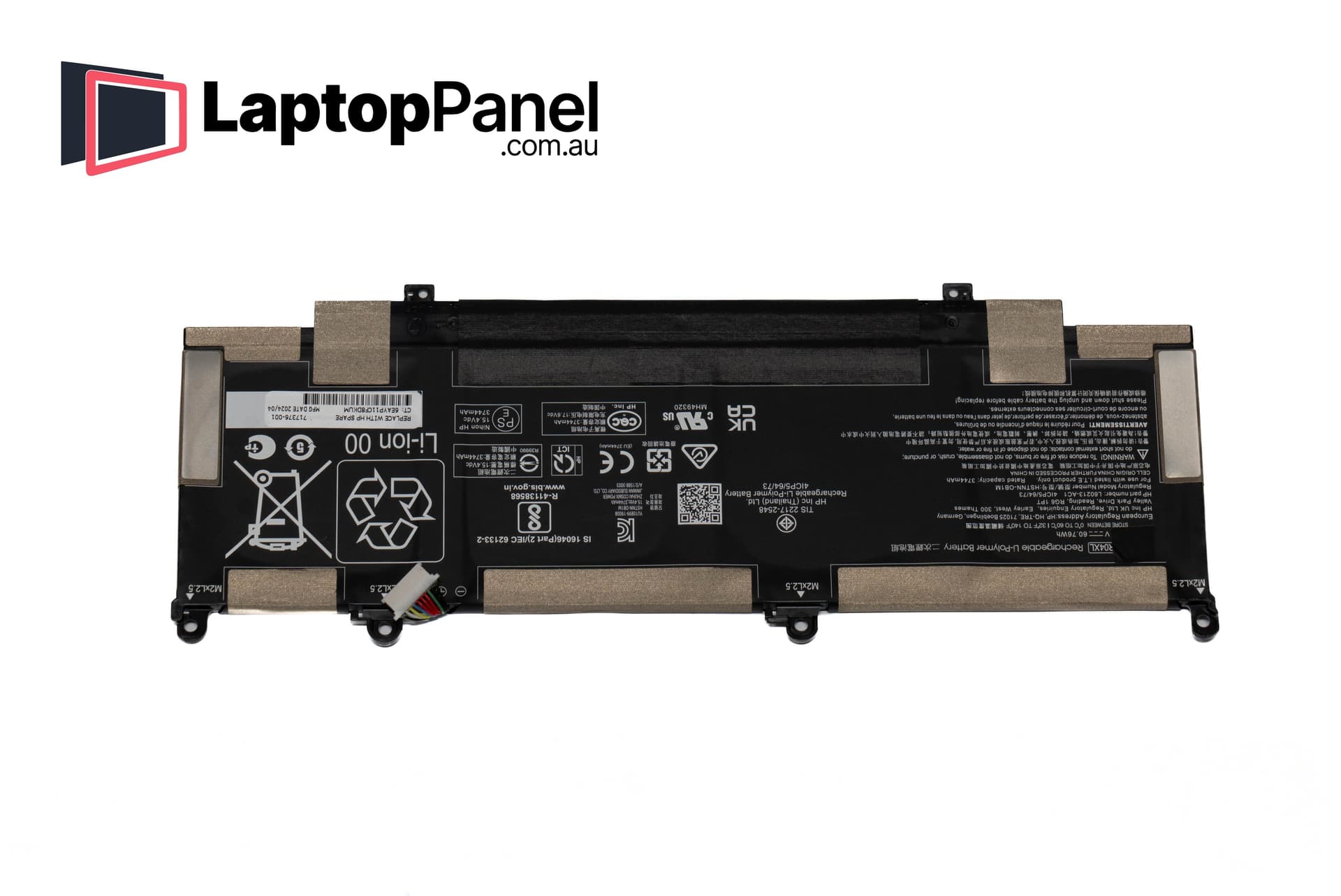
A replacement battery compatible with the HP Spectre x360 13-AW0008CA, supplied new. If your machine shuts down early, reports a swollen or "service" battery, or only runs on mains power, a new battery is the fix — and on most modern laptops it is a straightforward one. Before you order Specifications — compare the voltage, capacity and battery part code printed on your original with this listing, and check the model label on the underside of your laptop against the models named in the title. Batteries are shaped for their series and do not carry across between them. Variations — where the listing offers more than one option (capacity or grade), choose the variation that corresponds to what your machine came with. Images — check the photos for the connector type and the outline of the battery; both need to correspond to your original. Unsure? — send us a photo of the label on your existing battery together with your HP 13-AW0008CA and we will confirm compatibility. Swollen battery? — stop using the laptop, do not press on the case or trackpad, and replace it promptly. A swollen battery only gets worse. Fitting and battery care Power off and unplug before opening the base. Disconnect the old battery's connector first, and reconnect the new one last. Give the new battery a full charge before its first run on battery power. Recycle the old one: in Australia, any B-cycle drop-off point (most major supermarkets have one) takes laptop batteries free of charge. Never put a lithium battery in the bin. Warranty, returns and delivery Warranty: 6 Months Delivery: shipped Australia-wide with tracking. Returns: if a part arrives faulty or turns out not to be compatible with your machine, contact us first and we will make it right under our returns policy.
Warranty: 6 Months
Stock: In Stock

A replacement battery compatible with the HP Spectre x360 13-AW0008TU, supplied new. If your machine shuts down early, reports a swollen or "service" battery, or only runs on mains power, a new battery is the fix — and on most modern laptops it is a straightforward one. Before you order Specifications — compare the voltage, capacity and battery part code printed on your original with this listing, and check the model label on the underside of your laptop against the models named in the title. Batteries are shaped for their series and do not carry across between them. Variations — where the listing offers more than one option (capacity or grade), choose the variation that corresponds to what your machine came with. Images — check the photos for the connector type and the outline of the battery; both need to correspond to your original. Unsure? — send us a photo of the label on your existing battery together with your HP 13-AW0008TU and we will confirm compatibility. Swollen battery? — stop using the laptop, do not press on the case or trackpad, and replace it promptly. A swollen battery only gets worse. Fitting and battery care Power off and unplug before opening the base. Disconnect the old battery's connector first, and reconnect the new one last. Give the new battery a full charge before its first run on battery power. Recycle the old one: in Australia, any B-cycle drop-off point (most major supermarkets have one) takes laptop batteries free of charge. Never put a lithium battery in the bin. Warranty, returns and delivery Warranty: 6 Months Delivery: shipped Australia-wide with tracking. Returns: if a part arrives faulty or turns out not to be compatible with your machine, contact us first and we will make it right under our returns policy.
Warranty: 6 Months
Stock: In Stock

A replacement battery compatible with the HP Spectre x360 13-AW0010CA, supplied new. If your machine shuts down early, reports a swollen or "service" battery, or only runs on mains power, a new battery is the fix — and on most modern laptops it is a straightforward one. Before you order Specifications — compare the voltage, capacity and battery part code printed on your original with this listing, and check the model label on the underside of your laptop against the models named in the title. Batteries are shaped for their series and do not carry across between them. Variations — where the listing offers more than one option (capacity or grade), choose the variation that corresponds to what your machine came with. Images — check the photos for the connector type and the outline of the battery; both need to correspond to your original. Unsure? — send us a photo of the label on your existing battery together with your HP 13-AW0010CA and we will confirm compatibility. Swollen battery? — stop using the laptop, do not press on the case or trackpad, and replace it promptly. A swollen battery only gets worse. Fitting and battery care Power off and unplug before opening the base. Disconnect the old battery's connector first, and reconnect the new one last. Give the new battery a full charge before its first run on battery power. Recycle the old one: in Australia, any B-cycle drop-off point (most major supermarkets have one) takes laptop batteries free of charge. Never put a lithium battery in the bin. Warranty, returns and delivery Warranty: 6 Months Delivery: shipped Australia-wide with tracking. Returns: if a part arrives faulty or turns out not to be compatible with your machine, contact us first and we will make it right under our returns policy.
Warranty: 6 Months
Stock: In Stock

A replacement battery compatible with the HP Spectre x360 13-AW0013DX, supplied new. If your machine shuts down early, reports a swollen or "service" battery, or only runs on mains power, a new battery is the fix — and on most modern laptops it is a straightforward one. Before you order Specifications — compare the voltage, capacity and battery part code printed on your original with this listing, and check the model label on the underside of your laptop against the models named in the title. Batteries are shaped for their series and do not carry across between them. Variations — where the listing offers more than one option (capacity or grade), choose the variation that corresponds to what your machine came with. Images — check the photos for the connector type and the outline of the battery; both need to correspond to your original. Unsure? — send us a photo of the label on your existing battery together with your HP 13-AW0013DX and we will confirm compatibility. Swollen battery? — stop using the laptop, do not press on the case or trackpad, and replace it promptly. A swollen battery only gets worse. Fitting and battery care Power off and unplug before opening the base. Disconnect the old battery's connector first, and reconnect the new one last. Give the new battery a full charge before its first run on battery power. Recycle the old one: in Australia, any B-cycle drop-off point (most major supermarkets have one) takes laptop batteries free of charge. Never put a lithium battery in the bin. Warranty, returns and delivery Warranty: 6 Months Delivery: shipped Australia-wide with tracking. Returns: if a part arrives faulty or turns out not to be compatible with your machine, contact us first and we will make it right under our returns policy.
Warranty: 6 Months
Stock: In Stock

A replacement battery compatible with the HP Spectre x360 13-AW0020CA, supplied new. If your machine shuts down early, reports a swollen or "service" battery, or only runs on mains power, a new battery is the fix — and on most modern laptops it is a straightforward one. Before you order Specifications — compare the voltage, capacity and battery part code printed on your original with this listing, and check the model label on the underside of your laptop against the models named in the title. Batteries are shaped for their series and do not carry across between them. Variations — where the listing offers more than one option (capacity or grade), choose the variation that corresponds to what your machine came with. Images — check the photos for the connector type and the outline of the battery; both need to correspond to your original. Unsure? — send us a photo of the label on your existing battery together with your HP 13-AW0020CA and we will confirm compatibility. Swollen battery? — stop using the laptop, do not press on the case or trackpad, and replace it promptly. A swollen battery only gets worse. Fitting and battery care Power off and unplug before opening the base. Disconnect the old battery's connector first, and reconnect the new one last. Give the new battery a full charge before its first run on battery power. Recycle the old one: in Australia, any B-cycle drop-off point (most major supermarkets have one) takes laptop batteries free of charge. Never put a lithium battery in the bin. Warranty, returns and delivery Warranty: 6 Months Delivery: shipped Australia-wide with tracking. Returns: if a part arrives faulty or turns out not to be compatible with your machine, contact us first and we will make it right under our returns policy.
Warranty: 6 Months
Stock: In Stock

A replacement battery compatible with the HP Spectre x360 13-AW0039TU, supplied new. If your machine shuts down early, reports a swollen or "service" battery, or only runs on mains power, a new battery is the fix — and on most modern laptops it is a straightforward one. Before you order Specifications — compare the voltage, capacity and battery part code printed on your original with this listing, and check the model label on the underside of your laptop against the models named in the title. Batteries are shaped for their series and do not carry across between them. Variations — where the listing offers more than one option (capacity or grade), choose the variation that corresponds to what your machine came with. Images — check the photos for the connector type and the outline of the battery; both need to correspond to your original. Unsure? — send us a photo of the label on your existing battery together with your HP 13-AW0039TU and we will confirm compatibility. Swollen battery? — stop using the laptop, do not press on the case or trackpad, and replace it promptly. A swollen battery only gets worse. Fitting and battery care Power off and unplug before opening the base. Disconnect the old battery's connector first, and reconnect the new one last. Give the new battery a full charge before its first run on battery power. Recycle the old one: in Australia, any B-cycle drop-off point (most major supermarkets have one) takes laptop batteries free of charge. Never put a lithium battery in the bin. Warranty, returns and delivery Warranty: 6 Months Delivery: shipped Australia-wide with tracking. Returns: if a part arrives faulty or turns out not to be compatible with your machine, contact us first and we will make it right under our returns policy.
Warranty: 6 Months
Stock: In Stock

A replacement battery compatible with the HP Spectre x360 13-AW0040TU, supplied new. If your machine shuts down early, reports a swollen or "service" battery, or only runs on mains power, a new battery is the fix — and on most modern laptops it is a straightforward one. Before you order Specifications — compare the voltage, capacity and battery part code printed on your original with this listing, and check the model label on the underside of your laptop against the models named in the title. Batteries are shaped for their series and do not carry across between them. Variations — where the listing offers more than one option (capacity or grade), choose the variation that corresponds to what your machine came with. Images — check the photos for the connector type and the outline of the battery; both need to correspond to your original. Unsure? — send us a photo of the label on your existing battery together with your HP 13-AW0040TU and we will confirm compatibility. Swollen battery? — stop using the laptop, do not press on the case or trackpad, and replace it promptly. A swollen battery only gets worse. Fitting and battery care Power off and unplug before opening the base. Disconnect the old battery's connector first, and reconnect the new one last. Give the new battery a full charge before its first run on battery power. Recycle the old one: in Australia, any B-cycle drop-off point (most major supermarkets have one) takes laptop batteries free of charge. Never put a lithium battery in the bin. Warranty, returns and delivery Warranty: 6 Months Delivery: shipped Australia-wide with tracking. Returns: if a part arrives faulty or turns out not to be compatible with your machine, contact us first and we will make it right under our returns policy.
Warranty: 6 Months
Stock: In Stock

A replacement battery compatible with the HP Spectre x360 13-AW0042TU, supplied new. If your machine shuts down early, reports a swollen or "service" battery, or only runs on mains power, a new battery is the fix — and on most modern laptops it is a straightforward one. Before you order Specifications — compare the voltage, capacity and battery part code printed on your original with this listing, and check the model label on the underside of your laptop against the models named in the title. Batteries are shaped for their series and do not carry across between them. Variations — where the listing offers more than one option (capacity or grade), choose the variation that corresponds to what your machine came with. Images — check the photos for the connector type and the outline of the battery; both need to correspond to your original. Unsure? — send us a photo of the label on your existing battery together with your HP 13-AW0042TU and we will confirm compatibility. Swollen battery? — stop using the laptop, do not press on the case or trackpad, and replace it promptly. A swollen battery only gets worse. Fitting and battery care Power off and unplug before opening the base. Disconnect the old battery's connector first, and reconnect the new one last. Give the new battery a full charge before its first run on battery power. Recycle the old one: in Australia, any B-cycle drop-off point (most major supermarkets have one) takes laptop batteries free of charge. Never put a lithium battery in the bin. Warranty, returns and delivery Warranty: 6 Months Delivery: shipped Australia-wide with tracking. Returns: if a part arrives faulty or turns out not to be compatible with your machine, contact us first and we will make it right under our returns policy.
Warranty: 6 Months
Stock: In Stock

A replacement battery compatible with the HP Spectre x360 13-AW0043TU, supplied new. If your machine shuts down early, reports a swollen or "service" battery, or only runs on mains power, a new battery is the fix — and on most modern laptops it is a straightforward one. Before you order Specifications — compare the voltage, capacity and battery part code printed on your original with this listing, and check the model label on the underside of your laptop against the models named in the title. Batteries are shaped for their series and do not carry across between them. Variations — where the listing offers more than one option (capacity or grade), choose the variation that corresponds to what your machine came with. Images — check the photos for the connector type and the outline of the battery; both need to correspond to your original. Unsure? — send us a photo of the label on your existing battery together with your HP 13-AW0043TU and we will confirm compatibility. Swollen battery? — stop using the laptop, do not press on the case or trackpad, and replace it promptly. A swollen battery only gets worse. Fitting and battery care Power off and unplug before opening the base. Disconnect the old battery's connector first, and reconnect the new one last. Give the new battery a full charge before its first run on battery power. Recycle the old one: in Australia, any B-cycle drop-off point (most major supermarkets have one) takes laptop batteries free of charge. Never put a lithium battery in the bin. Warranty, returns and delivery Warranty: 6 Months Delivery: shipped Australia-wide with tracking. Returns: if a part arrives faulty or turns out not to be compatible with your machine, contact us first and we will make it right under our returns policy.
Warranty: 6 Months
Stock: In Stock

A replacement battery compatible with the HP Spectre x360 13-AW0044TU, supplied new. If your machine shuts down early, reports a swollen or "service" battery, or only runs on mains power, a new battery is the fix — and on most modern laptops it is a straightforward one. Before you order Specifications — compare the voltage, capacity and battery part code printed on your original with this listing, and check the model label on the underside of your laptop against the models named in the title. Batteries are shaped for their series and do not carry across between them. Variations — where the listing offers more than one option (capacity or grade), choose the variation that corresponds to what your machine came with. Images — check the photos for the connector type and the outline of the battery; both need to correspond to your original. Unsure? — send us a photo of the label on your existing battery together with your HP 13-AW0044TU and we will confirm compatibility. Swollen battery? — stop using the laptop, do not press on the case or trackpad, and replace it promptly. A swollen battery only gets worse. Fitting and battery care Power off and unplug before opening the base. Disconnect the old battery's connector first, and reconnect the new one last. Give the new battery a full charge before its first run on battery power. Recycle the old one: in Australia, any B-cycle drop-off point (most major supermarkets have one) takes laptop batteries free of charge. Never put a lithium battery in the bin. Warranty, returns and delivery Warranty: 6 Months Delivery: shipped Australia-wide with tracking. Returns: if a part arrives faulty or turns out not to be compatible with your machine, contact us first and we will make it right under our returns policy.
Warranty: 6 Months
Stock: In Stock

A replacement battery compatible with the HP Spectre x360 13-AW0045TU, supplied new. If your machine shuts down early, reports a swollen or "service" battery, or only runs on mains power, a new battery is the fix — and on most modern laptops it is a straightforward one. Before you order Specifications — compare the voltage, capacity and battery part code printed on your original with this listing, and check the model label on the underside of your laptop against the models named in the title. Batteries are shaped for their series and do not carry across between them. Variations — where the listing offers more than one option (capacity or grade), choose the variation that corresponds to what your machine came with. Images — check the photos for the connector type and the outline of the battery; both need to correspond to your original. Unsure? — send us a photo of the label on your existing battery together with your HP 13-AW0045TU and we will confirm compatibility. Swollen battery? — stop using the laptop, do not press on the case or trackpad, and replace it promptly. A swollen battery only gets worse. Fitting and battery care Power off and unplug before opening the base. Disconnect the old battery's connector first, and reconnect the new one last. Give the new battery a full charge before its first run on battery power. Recycle the old one: in Australia, any B-cycle drop-off point (most major supermarkets have one) takes laptop batteries free of charge. Never put a lithium battery in the bin. Warranty, returns and delivery Warranty: 6 Months Delivery: shipped Australia-wide with tracking. Returns: if a part arrives faulty or turns out not to be compatible with your machine, contact us first and we will make it right under our returns policy.
Warranty: 6 Months
Stock: In Stock

A replacement battery compatible with the HP Spectre x360 13-AW0048TU, supplied new. If your machine shuts down early, reports a swollen or "service" battery, or only runs on mains power, a new battery is the fix — and on most modern laptops it is a straightforward one. Before you order Specifications — compare the voltage, capacity and battery part code printed on your original with this listing, and check the model label on the underside of your laptop against the models named in the title. Batteries are shaped for their series and do not carry across between them. Variations — where the listing offers more than one option (capacity or grade), choose the variation that corresponds to what your machine came with. Images — check the photos for the connector type and the outline of the battery; both need to correspond to your original. Unsure? — send us a photo of the label on your existing battery together with your HP 13-AW0048TU and we will confirm compatibility. Swollen battery? — stop using the laptop, do not press on the case or trackpad, and replace it promptly. A swollen battery only gets worse. Fitting and battery care Power off and unplug before opening the base. Disconnect the old battery's connector first, and reconnect the new one last. Give the new battery a full charge before its first run on battery power. Recycle the old one: in Australia, any B-cycle drop-off point (most major supermarkets have one) takes laptop batteries free of charge. Never put a lithium battery in the bin. Warranty, returns and delivery Warranty: 6 Months Delivery: shipped Australia-wide with tracking. Returns: if a part arrives faulty or turns out not to be compatible with your machine, contact us first and we will make it right under our returns policy.
Warranty: 6 Months
Stock: In Stock

A replacement battery compatible with the HP Spectre x360 13-AW0050TU, supplied new. If your machine shuts down early, reports a swollen or "service" battery, or only runs on mains power, a new battery is the fix — and on most modern laptops it is a straightforward one. Before you order Specifications — compare the voltage, capacity and battery part code printed on your original with this listing, and check the model label on the underside of your laptop against the models named in the title. Batteries are shaped for their series and do not carry across between them. Variations — where the listing offers more than one option (capacity or grade), choose the variation that corresponds to what your machine came with. Images — check the photos for the connector type and the outline of the battery; both need to correspond to your original. Unsure? — send us a photo of the label on your existing battery together with your HP 13-AW0050TU and we will confirm compatibility. Swollen battery? — stop using the laptop, do not press on the case or trackpad, and replace it promptly. A swollen battery only gets worse. Fitting and battery care Power off and unplug before opening the base. Disconnect the old battery's connector first, and reconnect the new one last. Give the new battery a full charge before its first run on battery power. Recycle the old one: in Australia, any B-cycle drop-off point (most major supermarkets have one) takes laptop batteries free of charge. Never put a lithium battery in the bin. Warranty, returns and delivery Warranty: 6 Months Delivery: shipped Australia-wide with tracking. Returns: if a part arrives faulty or turns out not to be compatible with your machine, contact us first and we will make it right under our returns policy.
Warranty: 6 Months
Stock: In Stock

A replacement battery compatible with the HP Spectre x360 13-AW0051TU, supplied new. If your machine shuts down early, reports a swollen or "service" battery, or only runs on mains power, a new battery is the fix — and on most modern laptops it is a straightforward one. Before you order Specifications — compare the voltage, capacity and battery part code printed on your original with this listing, and check the model label on the underside of your laptop against the models named in the title. Batteries are shaped for their series and do not carry across between them. Variations — where the listing offers more than one option (capacity or grade), choose the variation that corresponds to what your machine came with. Images — check the photos for the connector type and the outline of the battery; both need to correspond to your original. Unsure? — send us a photo of the label on your existing battery together with your HP 13-AW0051TU and we will confirm compatibility. Swollen battery? — stop using the laptop, do not press on the case or trackpad, and replace it promptly. A swollen battery only gets worse. Fitting and battery care Power off and unplug before opening the base. Disconnect the old battery's connector first, and reconnect the new one last. Give the new battery a full charge before its first run on battery power. Recycle the old one: in Australia, any B-cycle drop-off point (most major supermarkets have one) takes laptop batteries free of charge. Never put a lithium battery in the bin. Warranty, returns and delivery Warranty: 6 Months Delivery: shipped Australia-wide with tracking. Returns: if a part arrives faulty or turns out not to be compatible with your machine, contact us first and we will make it right under our returns policy.
Warranty: 6 Months
Stock: In Stock

A replacement battery compatible with the HP Spectre x360 13-AW0052TU, supplied new. If your machine shuts down early, reports a swollen or "service" battery, or only runs on mains power, a new battery is the fix — and on most modern laptops it is a straightforward one. Before you order Specifications — compare the voltage, capacity and battery part code printed on your original with this listing, and check the model label on the underside of your laptop against the models named in the title. Batteries are shaped for their series and do not carry across between them. Variations — where the listing offers more than one option (capacity or grade), choose the variation that corresponds to what your machine came with. Images — check the photos for the connector type and the outline of the battery; both need to correspond to your original. Unsure? — send us a photo of the label on your existing battery together with your HP 13-AW0052TU and we will confirm compatibility. Swollen battery? — stop using the laptop, do not press on the case or trackpad, and replace it promptly. A swollen battery only gets worse. Fitting and battery care Power off and unplug before opening the base. Disconnect the old battery's connector first, and reconnect the new one last. Give the new battery a full charge before its first run on battery power. Recycle the old one: in Australia, any B-cycle drop-off point (most major supermarkets have one) takes laptop batteries free of charge. Never put a lithium battery in the bin. Warranty, returns and delivery Warranty: 6 Months Delivery: shipped Australia-wide with tracking. Returns: if a part arrives faulty or turns out not to be compatible with your machine, contact us first and we will make it right under our returns policy.
Warranty: 6 Months
Stock: In Stock

A replacement battery compatible with the HP Spectre x360 13-AW0053TU, supplied new. If your machine shuts down early, reports a swollen or "service" battery, or only runs on mains power, a new battery is the fix — and on most modern laptops it is a straightforward one. Before you order Specifications — compare the voltage, capacity and battery part code printed on your original with this listing, and check the model label on the underside of your laptop against the models named in the title. Batteries are shaped for their series and do not carry across between them. Variations — where the listing offers more than one option (capacity or grade), choose the variation that corresponds to what your machine came with. Images — check the photos for the connector type and the outline of the battery; both need to correspond to your original. Unsure? — send us a photo of the label on your existing battery together with your HP 13-AW0053TU and we will confirm compatibility. Swollen battery? — stop using the laptop, do not press on the case or trackpad, and replace it promptly. A swollen battery only gets worse. Fitting and battery care Power off and unplug before opening the base. Disconnect the old battery's connector first, and reconnect the new one last. Give the new battery a full charge before its first run on battery power. Recycle the old one: in Australia, any B-cycle drop-off point (most major supermarkets have one) takes laptop batteries free of charge. Never put a lithium battery in the bin. Warranty, returns and delivery Warranty: 6 Months Delivery: shipped Australia-wide with tracking. Returns: if a part arrives faulty or turns out not to be compatible with your machine, contact us first and we will make it right under our returns policy.
Warranty: 6 Months
Stock: In Stock

A replacement battery compatible with the HP Spectre x360 13-AW0054TU, supplied new. If your machine shuts down early, reports a swollen or "service" battery, or only runs on mains power, a new battery is the fix — and on most modern laptops it is a straightforward one. Before you order Specifications — compare the voltage, capacity and battery part code printed on your original with this listing, and check the model label on the underside of your laptop against the models named in the title. Batteries are shaped for their series and do not carry across between them. Variations — where the listing offers more than one option (capacity or grade), choose the variation that corresponds to what your machine came with. Images — check the photos for the connector type and the outline of the battery; both need to correspond to your original. Unsure? — send us a photo of the label on your existing battery together with your HP 13-AW0054TU and we will confirm compatibility. Swollen battery? — stop using the laptop, do not press on the case or trackpad, and replace it promptly. A swollen battery only gets worse. Fitting and battery care Power off and unplug before opening the base. Disconnect the old battery's connector first, and reconnect the new one last. Give the new battery a full charge before its first run on battery power. Recycle the old one: in Australia, any B-cycle drop-off point (most major supermarkets have one) takes laptop batteries free of charge. Never put a lithium battery in the bin. Warranty, returns and delivery Warranty: 6 Months Delivery: shipped Australia-wide with tracking. Returns: if a part arrives faulty or turns out not to be compatible with your machine, contact us first and we will make it right under our returns policy.
Warranty: 6 Months
Stock: In Stock

A replacement battery compatible with the HP Spectre x360 13-AW0056TU, supplied new. If your machine shuts down early, reports a swollen or "service" battery, or only runs on mains power, a new battery is the fix — and on most modern laptops it is a straightforward one. Before you order Specifications — compare the voltage, capacity and battery part code printed on your original with this listing, and check the model label on the underside of your laptop against the models named in the title. Batteries are shaped for their series and do not carry across between them. Variations — where the listing offers more than one option (capacity or grade), choose the variation that corresponds to what your machine came with. Images — check the photos for the connector type and the outline of the battery; both need to correspond to your original. Unsure? — send us a photo of the label on your existing battery together with your HP 13-AW0056TU and we will confirm compatibility. Swollen battery? — stop using the laptop, do not press on the case or trackpad, and replace it promptly. A swollen battery only gets worse. Fitting and battery care Power off and unplug before opening the base. Disconnect the old battery's connector first, and reconnect the new one last. Give the new battery a full charge before its first run on battery power. Recycle the old one: in Australia, any B-cycle drop-off point (most major supermarkets have one) takes laptop batteries free of charge. Never put a lithium battery in the bin. Warranty, returns and delivery Warranty: 6 Months Delivery: shipped Australia-wide with tracking. Returns: if a part arrives faulty or turns out not to be compatible with your machine, contact us first and we will make it right under our returns policy.
Warranty: 6 Months
Stock: In Stock

A replacement battery compatible with the HP Spectre x360 13-AW0058TU, supplied new. If your machine shuts down early, reports a swollen or "service" battery, or only runs on mains power, a new battery is the fix — and on most modern laptops it is a straightforward one. Before you order Specifications — compare the voltage, capacity and battery part code printed on your original with this listing, and check the model label on the underside of your laptop against the models named in the title. Batteries are shaped for their series and do not carry across between them. Variations — where the listing offers more than one option (capacity or grade), choose the variation that corresponds to what your machine came with. Images — check the photos for the connector type and the outline of the battery; both need to correspond to your original. Unsure? — send us a photo of the label on your existing battery together with your HP 13-AW0058TU and we will confirm compatibility. Swollen battery? — stop using the laptop, do not press on the case or trackpad, and replace it promptly. A swollen battery only gets worse. Fitting and battery care Power off and unplug before opening the base. Disconnect the old battery's connector first, and reconnect the new one last. Give the new battery a full charge before its first run on battery power. Recycle the old one: in Australia, any B-cycle drop-off point (most major supermarkets have one) takes laptop batteries free of charge. Never put a lithium battery in the bin. Warranty, returns and delivery Warranty: 6 Months Delivery: shipped Australia-wide with tracking. Returns: if a part arrives faulty or turns out not to be compatible with your machine, contact us first and we will make it right under our returns policy.
Warranty: 6 Months
Stock: In Stock

A replacement battery compatible with the HP Spectre x360 13-AW0059TU, supplied new. If your machine shuts down early, reports a swollen or "service" battery, or only runs on mains power, a new battery is the fix — and on most modern laptops it is a straightforward one. Before you order Specifications — compare the voltage, capacity and battery part code printed on your original with this listing, and check the model label on the underside of your laptop against the models named in the title. Batteries are shaped for their series and do not carry across between them. Variations — where the listing offers more than one option (capacity or grade), choose the variation that corresponds to what your machine came with. Images — check the photos for the connector type and the outline of the battery; both need to correspond to your original. Unsure? — send us a photo of the label on your existing battery together with your HP 13-AW0059TU and we will confirm compatibility. Swollen battery? — stop using the laptop, do not press on the case or trackpad, and replace it promptly. A swollen battery only gets worse. Fitting and battery care Power off and unplug before opening the base. Disconnect the old battery's connector first, and reconnect the new one last. Give the new battery a full charge before its first run on battery power. Recycle the old one: in Australia, any B-cycle drop-off point (most major supermarkets have one) takes laptop batteries free of charge. Never put a lithium battery in the bin. Warranty, returns and delivery Warranty: 6 Months Delivery: shipped Australia-wide with tracking. Returns: if a part arrives faulty or turns out not to be compatible with your machine, contact us first and we will make it right under our returns policy.
Warranty: 6 Months
Stock: In Stock

A replacement battery compatible with the HP Spectre x360 13-AW0065TU, supplied new. If your machine shuts down early, reports a swollen or "service" battery, or only runs on mains power, a new battery is the fix — and on most modern laptops it is a straightforward one. Before you order Specifications — compare the voltage, capacity and battery part code printed on your original with this listing, and check the model label on the underside of your laptop against the models named in the title. Batteries are shaped for their series and do not carry across between them. Variations — where the listing offers more than one option (capacity or grade), choose the variation that corresponds to what your machine came with. Images — check the photos for the connector type and the outline of the battery; both need to correspond to your original. Unsure? — send us a photo of the label on your existing battery together with your HP 13-AW0065TU and we will confirm compatibility. Swollen battery? — stop using the laptop, do not press on the case or trackpad, and replace it promptly. A swollen battery only gets worse. Fitting and battery care Power off and unplug before opening the base. Disconnect the old battery's connector first, and reconnect the new one last. Give the new battery a full charge before its first run on battery power. Recycle the old one: in Australia, any B-cycle drop-off point (most major supermarkets have one) takes laptop batteries free of charge. Never put a lithium battery in the bin. Warranty, returns and delivery Warranty: 6 Months Delivery: shipped Australia-wide with tracking. Returns: if a part arrives faulty or turns out not to be compatible with your machine, contact us first and we will make it right under our returns policy.
Warranty: 6 Months
Stock: In Stock

A replacement battery compatible with the HP Spectre x360 13-AW0066TU, supplied new. If your machine shuts down early, reports a swollen or "service" battery, or only runs on mains power, a new battery is the fix — and on most modern laptops it is a straightforward one. Before you order Specifications — compare the voltage, capacity and battery part code printed on your original with this listing, and check the model label on the underside of your laptop against the models named in the title. Batteries are shaped for their series and do not carry across between them. Variations — where the listing offers more than one option (capacity or grade), choose the variation that corresponds to what your machine came with. Images — check the photos for the connector type and the outline of the battery; both need to correspond to your original. Unsure? — send us a photo of the label on your existing battery together with your HP 13-AW0066TU and we will confirm compatibility. Swollen battery? — stop using the laptop, do not press on the case or trackpad, and replace it promptly. A swollen battery only gets worse. Fitting and battery care Power off and unplug before opening the base. Disconnect the old battery's connector first, and reconnect the new one last. Give the new battery a full charge before its first run on battery power. Recycle the old one: in Australia, any B-cycle drop-off point (most major supermarkets have one) takes laptop batteries free of charge. Never put a lithium battery in the bin. Warranty, returns and delivery Warranty: 6 Months Delivery: shipped Australia-wide with tracking. Returns: if a part arrives faulty or turns out not to be compatible with your machine, contact us first and we will make it right under our returns policy.
Warranty: 6 Months
Stock: In Stock

A replacement battery compatible with the HP Spectre x360 13-AW0069TU, supplied new. If your machine shuts down early, reports a swollen or "service" battery, or only runs on mains power, a new battery is the fix — and on most modern laptops it is a straightforward one. Before you order Specifications — compare the voltage, capacity and battery part code printed on your original with this listing, and check the model label on the underside of your laptop against the models named in the title. Batteries are shaped for their series and do not carry across between them. Variations — where the listing offers more than one option (capacity or grade), choose the variation that corresponds to what your machine came with. Images — check the photos for the connector type and the outline of the battery; both need to correspond to your original. Unsure? — send us a photo of the label on your existing battery together with your HP 13-AW0069TU and we will confirm compatibility. Swollen battery? — stop using the laptop, do not press on the case or trackpad, and replace it promptly. A swollen battery only gets worse. Fitting and battery care Power off and unplug before opening the base. Disconnect the old battery's connector first, and reconnect the new one last. Give the new battery a full charge before its first run on battery power. Recycle the old one: in Australia, any B-cycle drop-off point (most major supermarkets have one) takes laptop batteries free of charge. Never put a lithium battery in the bin. Warranty, returns and delivery Warranty: 6 Months Delivery: shipped Australia-wide with tracking. Returns: if a part arrives faulty or turns out not to be compatible with your machine, contact us first and we will make it right under our returns policy.
Warranty: 6 Months
Stock: In Stock

A replacement battery compatible with the HP Spectre x360 13-AW0070TU, supplied new. If your machine shuts down early, reports a swollen or "service" battery, or only runs on mains power, a new battery is the fix — and on most modern laptops it is a straightforward one. Before you order Specifications — compare the voltage, capacity and battery part code printed on your original with this listing, and check the model label on the underside of your laptop against the models named in the title. Batteries are shaped for their series and do not carry across between them. Variations — where the listing offers more than one option (capacity or grade), choose the variation that corresponds to what your machine came with. Images — check the photos for the connector type and the outline of the battery; both need to correspond to your original. Unsure? — send us a photo of the label on your existing battery together with your HP 13-AW0070TU and we will confirm compatibility. Swollen battery? — stop using the laptop, do not press on the case or trackpad, and replace it promptly. A swollen battery only gets worse. Fitting and battery care Power off and unplug before opening the base. Disconnect the old battery's connector first, and reconnect the new one last. Give the new battery a full charge before its first run on battery power. Recycle the old one: in Australia, any B-cycle drop-off point (most major supermarkets have one) takes laptop batteries free of charge. Never put a lithium battery in the bin. Warranty, returns and delivery Warranty: 6 Months Delivery: shipped Australia-wide with tracking. Returns: if a part arrives faulty or turns out not to be compatible with your machine, contact us first and we will make it right under our returns policy.
Warranty: 6 Months
Stock: In Stock

A replacement battery compatible with the HP Spectre x360 13-AW0071TU, supplied new. If your machine shuts down early, reports a swollen or "service" battery, or only runs on mains power, a new battery is the fix — and on most modern laptops it is a straightforward one. Before you order Specifications — compare the voltage, capacity and battery part code printed on your original with this listing, and check the model label on the underside of your laptop against the models named in the title. Batteries are shaped for their series and do not carry across between them. Variations — where the listing offers more than one option (capacity or grade), choose the variation that corresponds to what your machine came with. Images — check the photos for the connector type and the outline of the battery; both need to correspond to your original. Unsure? — send us a photo of the label on your existing battery together with your HP 13-AW0071TU and we will confirm compatibility. Swollen battery? — stop using the laptop, do not press on the case or trackpad, and replace it promptly. A swollen battery only gets worse. Fitting and battery care Power off and unplug before opening the base. Disconnect the old battery's connector first, and reconnect the new one last. Give the new battery a full charge before its first run on battery power. Recycle the old one: in Australia, any B-cycle drop-off point (most major supermarkets have one) takes laptop batteries free of charge. Never put a lithium battery in the bin. Warranty, returns and delivery Warranty: 6 Months Delivery: shipped Australia-wide with tracking. Returns: if a part arrives faulty or turns out not to be compatible with your machine, contact us first and we will make it right under our returns policy.
Warranty: 6 Months
Stock: In Stock

A replacement battery compatible with the HP Spectre x360 13-AW0072TU, supplied new. If your machine shuts down early, reports a swollen or "service" battery, or only runs on mains power, a new battery is the fix — and on most modern laptops it is a straightforward one. Before you order Specifications — compare the voltage, capacity and battery part code printed on your original with this listing, and check the model label on the underside of your laptop against the models named in the title. Batteries are shaped for their series and do not carry across between them. Variations — where the listing offers more than one option (capacity or grade), choose the variation that corresponds to what your machine came with. Images — check the photos for the connector type and the outline of the battery; both need to correspond to your original. Unsure? — send us a photo of the label on your existing battery together with your HP 13-AW0072TU and we will confirm compatibility. Swollen battery? — stop using the laptop, do not press on the case or trackpad, and replace it promptly. A swollen battery only gets worse. Fitting and battery care Power off and unplug before opening the base. Disconnect the old battery's connector first, and reconnect the new one last. Give the new battery a full charge before its first run on battery power. Recycle the old one: in Australia, any B-cycle drop-off point (most major supermarkets have one) takes laptop batteries free of charge. Never put a lithium battery in the bin. Warranty, returns and delivery Warranty: 6 Months Delivery: shipped Australia-wide with tracking. Returns: if a part arrives faulty or turns out not to be compatible with your machine, contact us first and we will make it right under our returns policy.
Warranty: 6 Months
Stock: In Stock

A replacement battery compatible with the HP Spectre x360 13-AW0074TU, supplied new. If your machine shuts down early, reports a swollen or "service" battery, or only runs on mains power, a new battery is the fix — and on most modern laptops it is a straightforward one. Before you order Specifications — compare the voltage, capacity and battery part code printed on your original with this listing, and check the model label on the underside of your laptop against the models named in the title. Batteries are shaped for their series and do not carry across between them. Variations — where the listing offers more than one option (capacity or grade), choose the variation that corresponds to what your machine came with. Images — check the photos for the connector type and the outline of the battery; both need to correspond to your original. Unsure? — send us a photo of the label on your existing battery together with your HP 13-AW0074TU and we will confirm compatibility. Swollen battery? — stop using the laptop, do not press on the case or trackpad, and replace it promptly. A swollen battery only gets worse. Fitting and battery care Power off and unplug before opening the base. Disconnect the old battery's connector first, and reconnect the new one last. Give the new battery a full charge before its first run on battery power. Recycle the old one: in Australia, any B-cycle drop-off point (most major supermarkets have one) takes laptop batteries free of charge. Never put a lithium battery in the bin. Warranty, returns and delivery Warranty: 6 Months Delivery: shipped Australia-wide with tracking. Returns: if a part arrives faulty or turns out not to be compatible with your machine, contact us first and we will make it right under our returns policy.
Warranty: 6 Months
Stock: In Stock

A replacement battery compatible with the HP Spectre x360 13-AW0075TU, supplied new. If your machine shuts down early, reports a swollen or "service" battery, or only runs on mains power, a new battery is the fix — and on most modern laptops it is a straightforward one. Before you order Specifications — compare the voltage, capacity and battery part code printed on your original with this listing, and check the model label on the underside of your laptop against the models named in the title. Batteries are shaped for their series and do not carry across between them. Variations — where the listing offers more than one option (capacity or grade), choose the variation that corresponds to what your machine came with. Images — check the photos for the connector type and the outline of the battery; both need to correspond to your original. Unsure? — send us a photo of the label on your existing battery together with your HP 13-AW0075TU and we will confirm compatibility. Swollen battery? — stop using the laptop, do not press on the case or trackpad, and replace it promptly. A swollen battery only gets worse. Fitting and battery care Power off and unplug before opening the base. Disconnect the old battery's connector first, and reconnect the new one last. Give the new battery a full charge before its first run on battery power. Recycle the old one: in Australia, any B-cycle drop-off point (most major supermarkets have one) takes laptop batteries free of charge. Never put a lithium battery in the bin. Warranty, returns and delivery Warranty: 6 Months Delivery: shipped Australia-wide with tracking. Returns: if a part arrives faulty or turns out not to be compatible with your machine, contact us first and we will make it right under our returns policy.
Warranty: 6 Months
Stock: In Stock

A replacement battery compatible with the HP Spectre x360 13-AW0118TU, supplied new. If your machine shuts down early, reports a swollen or "service" battery, or only runs on mains power, a new battery is the fix — and on most modern laptops it is a straightforward one. Before you order Specifications — compare the voltage, capacity and battery part code printed on your original with this listing, and check the model label on the underside of your laptop against the models named in the title. Batteries are shaped for their series and do not carry across between them. Variations — where the listing offers more than one option (capacity or grade), choose the variation that corresponds to what your machine came with. Images — check the photos for the connector type and the outline of the battery; both need to correspond to your original. Unsure? — send us a photo of the label on your existing battery together with your HP 13-AW0118TU and we will confirm compatibility. Swollen battery? — stop using the laptop, do not press on the case or trackpad, and replace it promptly. A swollen battery only gets worse. Fitting and battery care Power off and unplug before opening the base. Disconnect the old battery's connector first, and reconnect the new one last. Give the new battery a full charge before its first run on battery power. Recycle the old one: in Australia, any B-cycle drop-off point (most major supermarkets have one) takes laptop batteries free of charge. Never put a lithium battery in the bin. Warranty, returns and delivery Warranty: 6 Months Delivery: shipped Australia-wide with tracking. Returns: if a part arrives faulty or turns out not to be compatible with your machine, contact us first and we will make it right under our returns policy.
Warranty: 6 Months
Stock: In Stock

A replacement battery compatible with the HP Spectre x360 13-AW0119TU, supplied new. If your machine shuts down early, reports a swollen or "service" battery, or only runs on mains power, a new battery is the fix — and on most modern laptops it is a straightforward one. Before you order Specifications — compare the voltage, capacity and battery part code printed on your original with this listing, and check the model label on the underside of your laptop against the models named in the title. Batteries are shaped for their series and do not carry across between them. Variations — where the listing offers more than one option (capacity or grade), choose the variation that corresponds to what your machine came with. Images — check the photos for the connector type and the outline of the battery; both need to correspond to your original. Unsure? — send us a photo of the label on your existing battery together with your HP 13-AW0119TU and we will confirm compatibility. Swollen battery? — stop using the laptop, do not press on the case or trackpad, and replace it promptly. A swollen battery only gets worse. Fitting and battery care Power off and unplug before opening the base. Disconnect the old battery's connector first, and reconnect the new one last. Give the new battery a full charge before its first run on battery power. Recycle the old one: in Australia, any B-cycle drop-off point (most major supermarkets have one) takes laptop batteries free of charge. Never put a lithium battery in the bin. Warranty, returns and delivery Warranty: 6 Months Delivery: shipped Australia-wide with tracking. Returns: if a part arrives faulty or turns out not to be compatible with your machine, contact us first and we will make it right under our returns policy.
Warranty: 6 Months
Stock: In Stock

A replacement battery compatible with the HP Spectre x360 13-AW0120TU, supplied new. If your machine shuts down early, reports a swollen or "service" battery, or only runs on mains power, a new battery is the fix — and on most modern laptops it is a straightforward one. Before you order Specifications — compare the voltage, capacity and battery part code printed on your original with this listing, and check the model label on the underside of your laptop against the models named in the title. Batteries are shaped for their series and do not carry across between them. Variations — where the listing offers more than one option (capacity or grade), choose the variation that corresponds to what your machine came with. Images — check the photos for the connector type and the outline of the battery; both need to correspond to your original. Unsure? — send us a photo of the label on your existing battery together with your HP 13-AW0120TU and we will confirm compatibility. Swollen battery? — stop using the laptop, do not press on the case or trackpad, and replace it promptly. A swollen battery only gets worse. Fitting and battery care Power off and unplug before opening the base. Disconnect the old battery's connector first, and reconnect the new one last. Give the new battery a full charge before its first run on battery power. Recycle the old one: in Australia, any B-cycle drop-off point (most major supermarkets have one) takes laptop batteries free of charge. Never put a lithium battery in the bin. Warranty, returns and delivery Warranty: 6 Months Delivery: shipped Australia-wide with tracking. Returns: if a part arrives faulty or turns out not to be compatible with your machine, contact us first and we will make it right under our returns policy.
Warranty: 6 Months
Stock: In Stock

A replacement battery compatible with the HP Spectre x360 13-AW0121TU, supplied new. If your machine shuts down early, reports a swollen or "service" battery, or only runs on mains power, a new battery is the fix — and on most modern laptops it is a straightforward one. Before you order Specifications — compare the voltage, capacity and battery part code printed on your original with this listing, and check the model label on the underside of your laptop against the models named in the title. Batteries are shaped for their series and do not carry across between them. Variations — where the listing offers more than one option (capacity or grade), choose the variation that corresponds to what your machine came with. Images — check the photos for the connector type and the outline of the battery; both need to correspond to your original. Unsure? — send us a photo of the label on your existing battery together with your HP 13-AW0121TU and we will confirm compatibility. Swollen battery? — stop using the laptop, do not press on the case or trackpad, and replace it promptly. A swollen battery only gets worse. Fitting and battery care Power off and unplug before opening the base. Disconnect the old battery's connector first, and reconnect the new one last. Give the new battery a full charge before its first run on battery power. Recycle the old one: in Australia, any B-cycle drop-off point (most major supermarkets have one) takes laptop batteries free of charge. Never put a lithium battery in the bin. Warranty, returns and delivery Warranty: 6 Months Delivery: shipped Australia-wide with tracking. Returns: if a part arrives faulty or turns out not to be compatible with your machine, contact us first and we will make it right under our returns policy.
Warranty: 6 Months
Stock: In Stock

A replacement battery compatible with the HP Spectre x360 13-AW0124TU, supplied new. If your machine shuts down early, reports a swollen or "service" battery, or only runs on mains power, a new battery is the fix — and on most modern laptops it is a straightforward one. Before you order Specifications — compare the voltage, capacity and battery part code printed on your original with this listing, and check the model label on the underside of your laptop against the models named in the title. Batteries are shaped for their series and do not carry across between them. Variations — where the listing offers more than one option (capacity or grade), choose the variation that corresponds to what your machine came with. Images — check the photos for the connector type and the outline of the battery; both need to correspond to your original. Unsure? — send us a photo of the label on your existing battery together with your HP 13-AW0124TU and we will confirm compatibility. Swollen battery? — stop using the laptop, do not press on the case or trackpad, and replace it promptly. A swollen battery only gets worse. Fitting and battery care Power off and unplug before opening the base. Disconnect the old battery's connector first, and reconnect the new one last. Give the new battery a full charge before its first run on battery power. Recycle the old one: in Australia, any B-cycle drop-off point (most major supermarkets have one) takes laptop batteries free of charge. Never put a lithium battery in the bin. Warranty, returns and delivery Warranty: 6 Months Delivery: shipped Australia-wide with tracking. Returns: if a part arrives faulty or turns out not to be compatible with your machine, contact us first and we will make it right under our returns policy.
Warranty: 6 Months
Stock: In Stock

A replacement battery compatible with the HP Spectre x360 13-AW0125TU, supplied new. If your machine shuts down early, reports a swollen or "service" battery, or only runs on mains power, a new battery is the fix — and on most modern laptops it is a straightforward one. Before you order Specifications — compare the voltage, capacity and battery part code printed on your original with this listing, and check the model label on the underside of your laptop against the models named in the title. Batteries are shaped for their series and do not carry across between them. Variations — where the listing offers more than one option (capacity or grade), choose the variation that corresponds to what your machine came with. Images — check the photos for the connector type and the outline of the battery; both need to correspond to your original. Unsure? — send us a photo of the label on your existing battery together with your HP 13-AW0125TU and we will confirm compatibility. Swollen battery? — stop using the laptop, do not press on the case or trackpad, and replace it promptly. A swollen battery only gets worse. Fitting and battery care Power off and unplug before opening the base. Disconnect the old battery's connector first, and reconnect the new one last. Give the new battery a full charge before its first run on battery power. Recycle the old one: in Australia, any B-cycle drop-off point (most major supermarkets have one) takes laptop batteries free of charge. Never put a lithium battery in the bin. Warranty, returns and delivery Warranty: 6 Months Delivery: shipped Australia-wide with tracking. Returns: if a part arrives faulty or turns out not to be compatible with your machine, contact us first and we will make it right under our returns policy.
Warranty: 6 Months
Stock: In Stock

A replacement battery compatible with the HP Spectre x360 13-AW0127TU, supplied new. If your machine shuts down early, reports a swollen or "service" battery, or only runs on mains power, a new battery is the fix — and on most modern laptops it is a straightforward one. Before you order Specifications — compare the voltage, capacity and battery part code printed on your original with this listing, and check the model label on the underside of your laptop against the models named in the title. Batteries are shaped for their series and do not carry across between them. Variations — where the listing offers more than one option (capacity or grade), choose the variation that corresponds to what your machine came with. Images — check the photos for the connector type and the outline of the battery; both need to correspond to your original. Unsure? — send us a photo of the label on your existing battery together with your HP 13-AW0127TU and we will confirm compatibility. Swollen battery? — stop using the laptop, do not press on the case or trackpad, and replace it promptly. A swollen battery only gets worse. Fitting and battery care Power off and unplug before opening the base. Disconnect the old battery's connector first, and reconnect the new one last. Give the new battery a full charge before its first run on battery power. Recycle the old one: in Australia, any B-cycle drop-off point (most major supermarkets have one) takes laptop batteries free of charge. Never put a lithium battery in the bin. Warranty, returns and delivery Warranty: 6 Months Delivery: shipped Australia-wide with tracking. Returns: if a part arrives faulty or turns out not to be compatible with your machine, contact us first and we will make it right under our returns policy.
Warranty: 6 Months
Stock: In Stock

A replacement battery compatible with the HP Spectre x360 13-AW0132TU, supplied new. If your machine shuts down early, reports a swollen or "service" battery, or only runs on mains power, a new battery is the fix — and on most modern laptops it is a straightforward one. Before you order Specifications — compare the voltage, capacity and battery part code printed on your original with this listing, and check the model label on the underside of your laptop against the models named in the title. Batteries are shaped for their series and do not carry across between them. Variations — where the listing offers more than one option (capacity or grade), choose the variation that corresponds to what your machine came with. Images — check the photos for the connector type and the outline of the battery; both need to correspond to your original. Unsure? — send us a photo of the label on your existing battery together with your HP 13-AW0132TU and we will confirm compatibility. Swollen battery? — stop using the laptop, do not press on the case or trackpad, and replace it promptly. A swollen battery only gets worse. Fitting and battery care Power off and unplug before opening the base. Disconnect the old battery's connector first, and reconnect the new one last. Give the new battery a full charge before its first run on battery power. Recycle the old one: in Australia, any B-cycle drop-off point (most major supermarkets have one) takes laptop batteries free of charge. Never put a lithium battery in the bin. Warranty, returns and delivery Warranty: 6 Months Delivery: shipped Australia-wide with tracking. Returns: if a part arrives faulty or turns out not to be compatible with your machine, contact us first and we will make it right under our returns policy.
Warranty: 6 Months
Stock: In Stock

A replacement battery compatible with the HP Spectre x360 13-AW0133TU, supplied new. If your machine shuts down early, reports a swollen or "service" battery, or only runs on mains power, a new battery is the fix — and on most modern laptops it is a straightforward one. Before you order Specifications — compare the voltage, capacity and battery part code printed on your original with this listing, and check the model label on the underside of your laptop against the models named in the title. Batteries are shaped for their series and do not carry across between them. Variations — where the listing offers more than one option (capacity or grade), choose the variation that corresponds to what your machine came with. Images — check the photos for the connector type and the outline of the battery; both need to correspond to your original. Unsure? — send us a photo of the label on your existing battery together with your HP 13-AW0133TU and we will confirm compatibility. Swollen battery? — stop using the laptop, do not press on the case or trackpad, and replace it promptly. A swollen battery only gets worse. Fitting and battery care Power off and unplug before opening the base. Disconnect the old battery's connector first, and reconnect the new one last. Give the new battery a full charge before its first run on battery power. Recycle the old one: in Australia, any B-cycle drop-off point (most major supermarkets have one) takes laptop batteries free of charge. Never put a lithium battery in the bin. Warranty, returns and delivery Warranty: 6 Months Delivery: shipped Australia-wide with tracking. Returns: if a part arrives faulty or turns out not to be compatible with your machine, contact us first and we will make it right under our returns policy.
Warranty: 6 Months
Stock: In Stock

A replacement battery compatible with the HP Spectre x360 13-AW0134TU, supplied new. If your machine shuts down early, reports a swollen or "service" battery, or only runs on mains power, a new battery is the fix — and on most modern laptops it is a straightforward one. Before you order Specifications — compare the voltage, capacity and battery part code printed on your original with this listing, and check the model label on the underside of your laptop against the models named in the title. Batteries are shaped for their series and do not carry across between them. Variations — where the listing offers more than one option (capacity or grade), choose the variation that corresponds to what your machine came with. Images — check the photos for the connector type and the outline of the battery; both need to correspond to your original. Unsure? — send us a photo of the label on your existing battery together with your HP 13-AW0134TU and we will confirm compatibility. Swollen battery? — stop using the laptop, do not press on the case or trackpad, and replace it promptly. A swollen battery only gets worse. Fitting and battery care Power off and unplug before opening the base. Disconnect the old battery's connector first, and reconnect the new one last. Give the new battery a full charge before its first run on battery power. Recycle the old one: in Australia, any B-cycle drop-off point (most major supermarkets have one) takes laptop batteries free of charge. Never put a lithium battery in the bin. Warranty, returns and delivery Warranty: 6 Months Delivery: shipped Australia-wide with tracking. Returns: if a part arrives faulty or turns out not to be compatible with your machine, contact us first and we will make it right under our returns policy.
Warranty: 6 Months
Stock: In Stock

A replacement battery compatible with the HP Spectre x360 13-AW0137TU, supplied new. If your machine shuts down early, reports a swollen or "service" battery, or only runs on mains power, a new battery is the fix — and on most modern laptops it is a straightforward one. Before you order Specifications — compare the voltage, capacity and battery part code printed on your original with this listing, and check the model label on the underside of your laptop against the models named in the title. Batteries are shaped for their series and do not carry across between them. Variations — where the listing offers more than one option (capacity or grade), choose the variation that corresponds to what your machine came with. Images — check the photos for the connector type and the outline of the battery; both need to correspond to your original. Unsure? — send us a photo of the label on your existing battery together with your HP 13-AW0137TU and we will confirm compatibility. Swollen battery? — stop using the laptop, do not press on the case or trackpad, and replace it promptly. A swollen battery only gets worse. Fitting and battery care Power off and unplug before opening the base. Disconnect the old battery's connector first, and reconnect the new one last. Give the new battery a full charge before its first run on battery power. Recycle the old one: in Australia, any B-cycle drop-off point (most major supermarkets have one) takes laptop batteries free of charge. Never put a lithium battery in the bin. Warranty, returns and delivery Warranty: 6 Months Delivery: shipped Australia-wide with tracking. Returns: if a part arrives faulty or turns out not to be compatible with your machine, contact us first and we will make it right under our returns policy.
Warranty: 6 Months
Stock: In Stock

A replacement battery compatible with the HP Spectre x360 13-AW0138TU, supplied new. If your machine shuts down early, reports a swollen or "service" battery, or only runs on mains power, a new battery is the fix — and on most modern laptops it is a straightforward one. Before you order Specifications — compare the voltage, capacity and battery part code printed on your original with this listing, and check the model label on the underside of your laptop against the models named in the title. Batteries are shaped for their series and do not carry across between them. Variations — where the listing offers more than one option (capacity or grade), choose the variation that corresponds to what your machine came with. Images — check the photos for the connector type and the outline of the battery; both need to correspond to your original. Unsure? — send us a photo of the label on your existing battery together with your HP 13-AW0138TU and we will confirm compatibility. Swollen battery? — stop using the laptop, do not press on the case or trackpad, and replace it promptly. A swollen battery only gets worse. Fitting and battery care Power off and unplug before opening the base. Disconnect the old battery's connector first, and reconnect the new one last. Give the new battery a full charge before its first run on battery power. Recycle the old one: in Australia, any B-cycle drop-off point (most major supermarkets have one) takes laptop batteries free of charge. Never put a lithium battery in the bin. Warranty, returns and delivery Warranty: 6 Months Delivery: shipped Australia-wide with tracking. Returns: if a part arrives faulty or turns out not to be compatible with your machine, contact us first and we will make it right under our returns policy.
Warranty: 6 Months
Stock: In Stock

A replacement battery compatible with the HP Spectre x360 13-AW0139TU, supplied new. If your machine shuts down early, reports a swollen or "service" battery, or only runs on mains power, a new battery is the fix — and on most modern laptops it is a straightforward one. Before you order Specifications — compare the voltage, capacity and battery part code printed on your original with this listing, and check the model label on the underside of your laptop against the models named in the title. Batteries are shaped for their series and do not carry across between them. Variations — where the listing offers more than one option (capacity or grade), choose the variation that corresponds to what your machine came with. Images — check the photos for the connector type and the outline of the battery; both need to correspond to your original. Unsure? — send us a photo of the label on your existing battery together with your HP 13-AW0139TU and we will confirm compatibility. Swollen battery? — stop using the laptop, do not press on the case or trackpad, and replace it promptly. A swollen battery only gets worse. Fitting and battery care Power off and unplug before opening the base. Disconnect the old battery's connector first, and reconnect the new one last. Give the new battery a full charge before its first run on battery power. Recycle the old one: in Australia, any B-cycle drop-off point (most major supermarkets have one) takes laptop batteries free of charge. Never put a lithium battery in the bin. Warranty, returns and delivery Warranty: 6 Months Delivery: shipped Australia-wide with tracking. Returns: if a part arrives faulty or turns out not to be compatible with your machine, contact us first and we will make it right under our returns policy.
Warranty: 6 Months
Stock: In Stock

A replacement battery compatible with the HP Spectre x360 13-AW0144TU, supplied new. If your machine shuts down early, reports a swollen or "service" battery, or only runs on mains power, a new battery is the fix — and on most modern laptops it is a straightforward one. Before you order Specifications — compare the voltage, capacity and battery part code printed on your original with this listing, and check the model label on the underside of your laptop against the models named in the title. Batteries are shaped for their series and do not carry across between them. Variations — where the listing offers more than one option (capacity or grade), choose the variation that corresponds to what your machine came with. Images — check the photos for the connector type and the outline of the battery; both need to correspond to your original. Unsure? — send us a photo of the label on your existing battery together with your HP 13-AW0144TU and we will confirm compatibility. Swollen battery? — stop using the laptop, do not press on the case or trackpad, and replace it promptly. A swollen battery only gets worse. Fitting and battery care Power off and unplug before opening the base. Disconnect the old battery's connector first, and reconnect the new one last. Give the new battery a full charge before its first run on battery power. Recycle the old one: in Australia, any B-cycle drop-off point (most major supermarkets have one) takes laptop batteries free of charge. Never put a lithium battery in the bin. Warranty, returns and delivery Warranty: 6 Months Delivery: shipped Australia-wide with tracking. Returns: if a part arrives faulty or turns out not to be compatible with your machine, contact us first and we will make it right under our returns policy.
Warranty: 6 Months
Stock: In Stock

A replacement battery compatible with the HP Spectre x360 13-AW0148TU, supplied new. If your machine shuts down early, reports a swollen or "service" battery, or only runs on mains power, a new battery is the fix — and on most modern laptops it is a straightforward one. Before you order Specifications — compare the voltage, capacity and battery part code printed on your original with this listing, and check the model label on the underside of your laptop against the models named in the title. Batteries are shaped for their series and do not carry across between them. Variations — where the listing offers more than one option (capacity or grade), choose the variation that corresponds to what your machine came with. Images — check the photos for the connector type and the outline of the battery; both need to correspond to your original. Unsure? — send us a photo of the label on your existing battery together with your HP 13-AW0148TU and we will confirm compatibility. Swollen battery? — stop using the laptop, do not press on the case or trackpad, and replace it promptly. A swollen battery only gets worse. Fitting and battery care Power off and unplug before opening the base. Disconnect the old battery's connector first, and reconnect the new one last. Give the new battery a full charge before its first run on battery power. Recycle the old one: in Australia, any B-cycle drop-off point (most major supermarkets have one) takes laptop batteries free of charge. Never put a lithium battery in the bin. Warranty, returns and delivery Warranty: 6 Months Delivery: shipped Australia-wide with tracking. Returns: if a part arrives faulty or turns out not to be compatible with your machine, contact us first and we will make it right under our returns policy.
Warranty: 6 Months
Stock: In Stock

A replacement battery compatible with the HP Spectre x360 13-AW0149TU, supplied new. If your machine shuts down early, reports a swollen or "service" battery, or only runs on mains power, a new battery is the fix — and on most modern laptops it is a straightforward one. Before you order Specifications — compare the voltage, capacity and battery part code printed on your original with this listing, and check the model label on the underside of your laptop against the models named in the title. Batteries are shaped for their series and do not carry across between them. Variations — where the listing offers more than one option (capacity or grade), choose the variation that corresponds to what your machine came with. Images — check the photos for the connector type and the outline of the battery; both need to correspond to your original. Unsure? — send us a photo of the label on your existing battery together with your HP 13-AW0149TU and we will confirm compatibility. Swollen battery? — stop using the laptop, do not press on the case or trackpad, and replace it promptly. A swollen battery only gets worse. Fitting and battery care Power off and unplug before opening the base. Disconnect the old battery's connector first, and reconnect the new one last. Give the new battery a full charge before its first run on battery power. Recycle the old one: in Australia, any B-cycle drop-off point (most major supermarkets have one) takes laptop batteries free of charge. Never put a lithium battery in the bin. Warranty, returns and delivery Warranty: 6 Months Delivery: shipped Australia-wide with tracking. Returns: if a part arrives faulty or turns out not to be compatible with your machine, contact us first and we will make it right under our returns policy.
Warranty: 6 Months
Stock: In Stock

A replacement battery compatible with the HP Spectre x360 13-AW0150TU, supplied new. If your machine shuts down early, reports a swollen or "service" battery, or only runs on mains power, a new battery is the fix — and on most modern laptops it is a straightforward one. Before you order Specifications — compare the voltage, capacity and battery part code printed on your original with this listing, and check the model label on the underside of your laptop against the models named in the title. Batteries are shaped for their series and do not carry across between them. Variations — where the listing offers more than one option (capacity or grade), choose the variation that corresponds to what your machine came with. Images — check the photos for the connector type and the outline of the battery; both need to correspond to your original. Unsure? — send us a photo of the label on your existing battery together with your HP 13-AW0150TU and we will confirm compatibility. Swollen battery? — stop using the laptop, do not press on the case or trackpad, and replace it promptly. A swollen battery only gets worse. Fitting and battery care Power off and unplug before opening the base. Disconnect the old battery's connector first, and reconnect the new one last. Give the new battery a full charge before its first run on battery power. Recycle the old one: in Australia, any B-cycle drop-off point (most major supermarkets have one) takes laptop batteries free of charge. Never put a lithium battery in the bin. Warranty, returns and delivery Warranty: 6 Months Delivery: shipped Australia-wide with tracking. Returns: if a part arrives faulty or turns out not to be compatible with your machine, contact us first and we will make it right under our returns policy.
Warranty: 6 Months
Stock: In Stock

A replacement battery compatible with the HP Spectre x360 13-AW0151TU, supplied new. If your machine shuts down early, reports a swollen or "service" battery, or only runs on mains power, a new battery is the fix — and on most modern laptops it is a straightforward one. Before you order Specifications — compare the voltage, capacity and battery part code printed on your original with this listing, and check the model label on the underside of your laptop against the models named in the title. Batteries are shaped for their series and do not carry across between them. Variations — where the listing offers more than one option (capacity or grade), choose the variation that corresponds to what your machine came with. Images — check the photos for the connector type and the outline of the battery; both need to correspond to your original. Unsure? — send us a photo of the label on your existing battery together with your HP 13-AW0151TU and we will confirm compatibility. Swollen battery? — stop using the laptop, do not press on the case or trackpad, and replace it promptly. A swollen battery only gets worse. Fitting and battery care Power off and unplug before opening the base. Disconnect the old battery's connector first, and reconnect the new one last. Give the new battery a full charge before its first run on battery power. Recycle the old one: in Australia, any B-cycle drop-off point (most major supermarkets have one) takes laptop batteries free of charge. Never put a lithium battery in the bin. Warranty, returns and delivery Warranty: 6 Months Delivery: shipped Australia-wide with tracking. Returns: if a part arrives faulty or turns out not to be compatible with your machine, contact us first and we will make it right under our returns policy.
Warranty: 6 Months
Stock: In Stock

A replacement battery compatible with the HP Spectre x360 13-AW0152TU, supplied new. If your machine shuts down early, reports a swollen or "service" battery, or only runs on mains power, a new battery is the fix — and on most modern laptops it is a straightforward one. Before you order Specifications — compare the voltage, capacity and battery part code printed on your original with this listing, and check the model label on the underside of your laptop against the models named in the title. Batteries are shaped for their series and do not carry across between them. Variations — where the listing offers more than one option (capacity or grade), choose the variation that corresponds to what your machine came with. Images — check the photos for the connector type and the outline of the battery; both need to correspond to your original. Unsure? — send us a photo of the label on your existing battery together with your HP 13-AW0152TU and we will confirm compatibility. Swollen battery? — stop using the laptop, do not press on the case or trackpad, and replace it promptly. A swollen battery only gets worse. Fitting and battery care Power off and unplug before opening the base. Disconnect the old battery's connector first, and reconnect the new one last. Give the new battery a full charge before its first run on battery power. Recycle the old one: in Australia, any B-cycle drop-off point (most major supermarkets have one) takes laptop batteries free of charge. Never put a lithium battery in the bin. Warranty, returns and delivery Warranty: 6 Months Delivery: shipped Australia-wide with tracking. Returns: if a part arrives faulty or turns out not to be compatible with your machine, contact us first and we will make it right under our returns policy.
Warranty: 6 Months
Stock: In Stock

A replacement battery compatible with the HP Spectre x360 13-AW0153TU, supplied new. If your machine shuts down early, reports a swollen or "service" battery, or only runs on mains power, a new battery is the fix — and on most modern laptops it is a straightforward one. Before you order Specifications — compare the voltage, capacity and battery part code printed on your original with this listing, and check the model label on the underside of your laptop against the models named in the title. Batteries are shaped for their series and do not carry across between them. Variations — where the listing offers more than one option (capacity or grade), choose the variation that corresponds to what your machine came with. Images — check the photos for the connector type and the outline of the battery; both need to correspond to your original. Unsure? — send us a photo of the label on your existing battery together with your HP 13-AW0153TU and we will confirm compatibility. Swollen battery? — stop using the laptop, do not press on the case or trackpad, and replace it promptly. A swollen battery only gets worse. Fitting and battery care Power off and unplug before opening the base. Disconnect the old battery's connector first, and reconnect the new one last. Give the new battery a full charge before its first run on battery power. Recycle the old one: in Australia, any B-cycle drop-off point (most major supermarkets have one) takes laptop batteries free of charge. Never put a lithium battery in the bin. Warranty, returns and delivery Warranty: 6 Months Delivery: shipped Australia-wide with tracking. Returns: if a part arrives faulty or turns out not to be compatible with your machine, contact us first and we will make it right under our returns policy.
Warranty: 6 Months
Stock: In Stock

A replacement battery compatible with the HP Spectre x360 13-AW0154TU, supplied new. If your machine shuts down early, reports a swollen or "service" battery, or only runs on mains power, a new battery is the fix — and on most modern laptops it is a straightforward one. Before you order Specifications — compare the voltage, capacity and battery part code printed on your original with this listing, and check the model label on the underside of your laptop against the models named in the title. Batteries are shaped for their series and do not carry across between them. Variations — where the listing offers more than one option (capacity or grade), choose the variation that corresponds to what your machine came with. Images — check the photos for the connector type and the outline of the battery; both need to correspond to your original. Unsure? — send us a photo of the label on your existing battery together with your HP 13-AW0154TU and we will confirm compatibility. Swollen battery? — stop using the laptop, do not press on the case or trackpad, and replace it promptly. A swollen battery only gets worse. Fitting and battery care Power off and unplug before opening the base. Disconnect the old battery's connector first, and reconnect the new one last. Give the new battery a full charge before its first run on battery power. Recycle the old one: in Australia, any B-cycle drop-off point (most major supermarkets have one) takes laptop batteries free of charge. Never put a lithium battery in the bin. Warranty, returns and delivery Warranty: 6 Months Delivery: shipped Australia-wide with tracking. Returns: if a part arrives faulty or turns out not to be compatible with your machine, contact us first and we will make it right under our returns policy.
Warranty: 6 Months
Stock: In Stock

A replacement battery compatible with the HP Spectre x360 13-AW0155TU, supplied new. If your machine shuts down early, reports a swollen or "service" battery, or only runs on mains power, a new battery is the fix — and on most modern laptops it is a straightforward one. Before you order Specifications — compare the voltage, capacity and battery part code printed on your original with this listing, and check the model label on the underside of your laptop against the models named in the title. Batteries are shaped for their series and do not carry across between them. Variations — where the listing offers more than one option (capacity or grade), choose the variation that corresponds to what your machine came with. Images — check the photos for the connector type and the outline of the battery; both need to correspond to your original. Unsure? — send us a photo of the label on your existing battery together with your HP 13-AW0155TU and we will confirm compatibility. Swollen battery? — stop using the laptop, do not press on the case or trackpad, and replace it promptly. A swollen battery only gets worse. Fitting and battery care Power off and unplug before opening the base. Disconnect the old battery's connector first, and reconnect the new one last. Give the new battery a full charge before its first run on battery power. Recycle the old one: in Australia, any B-cycle drop-off point (most major supermarkets have one) takes laptop batteries free of charge. Never put a lithium battery in the bin. Warranty, returns and delivery Warranty: 6 Months Delivery: shipped Australia-wide with tracking. Returns: if a part arrives faulty or turns out not to be compatible with your machine, contact us first and we will make it right under our returns policy.
Warranty: 6 Months
Stock: In Stock

A replacement battery compatible with the HP Spectre x360 13-AW0156TU, supplied new. If your machine shuts down early, reports a swollen or "service" battery, or only runs on mains power, a new battery is the fix — and on most modern laptops it is a straightforward one. Before you order Specifications — compare the voltage, capacity and battery part code printed on your original with this listing, and check the model label on the underside of your laptop against the models named in the title. Batteries are shaped for their series and do not carry across between them. Variations — where the listing offers more than one option (capacity or grade), choose the variation that corresponds to what your machine came with. Images — check the photos for the connector type and the outline of the battery; both need to correspond to your original. Unsure? — send us a photo of the label on your existing battery together with your HP 13-AW0156TU and we will confirm compatibility. Swollen battery? — stop using the laptop, do not press on the case or trackpad, and replace it promptly. A swollen battery only gets worse. Fitting and battery care Power off and unplug before opening the base. Disconnect the old battery's connector first, and reconnect the new one last. Give the new battery a full charge before its first run on battery power. Recycle the old one: in Australia, any B-cycle drop-off point (most major supermarkets have one) takes laptop batteries free of charge. Never put a lithium battery in the bin. Warranty, returns and delivery Warranty: 6 Months Delivery: shipped Australia-wide with tracking. Returns: if a part arrives faulty or turns out not to be compatible with your machine, contact us first and we will make it right under our returns policy.
Warranty: 6 Months
Stock: In Stock

A replacement battery compatible with the HP Spectre x360 13-AW0157TU, supplied new. If your machine shuts down early, reports a swollen or "service" battery, or only runs on mains power, a new battery is the fix — and on most modern laptops it is a straightforward one. Before you order Specifications — compare the voltage, capacity and battery part code printed on your original with this listing, and check the model label on the underside of your laptop against the models named in the title. Batteries are shaped for their series and do not carry across between them. Variations — where the listing offers more than one option (capacity or grade), choose the variation that corresponds to what your machine came with. Images — check the photos for the connector type and the outline of the battery; both need to correspond to your original. Unsure? — send us a photo of the label on your existing battery together with your HP 13-AW0157TU and we will confirm compatibility. Swollen battery? — stop using the laptop, do not press on the case or trackpad, and replace it promptly. A swollen battery only gets worse. Fitting and battery care Power off and unplug before opening the base. Disconnect the old battery's connector first, and reconnect the new one last. Give the new battery a full charge before its first run on battery power. Recycle the old one: in Australia, any B-cycle drop-off point (most major supermarkets have one) takes laptop batteries free of charge. Never put a lithium battery in the bin. Warranty, returns and delivery Warranty: 6 Months Delivery: shipped Australia-wide with tracking. Returns: if a part arrives faulty or turns out not to be compatible with your machine, contact us first and we will make it right under our returns policy.
Warranty: 6 Months
Stock: In Stock

A replacement battery compatible with the HP Spectre x360 13-AW0158TU, supplied new. If your machine shuts down early, reports a swollen or "service" battery, or only runs on mains power, a new battery is the fix — and on most modern laptops it is a straightforward one. Before you order Specifications — compare the voltage, capacity and battery part code printed on your original with this listing, and check the model label on the underside of your laptop against the models named in the title. Batteries are shaped for their series and do not carry across between them. Variations — where the listing offers more than one option (capacity or grade), choose the variation that corresponds to what your machine came with. Images — check the photos for the connector type and the outline of the battery; both need to correspond to your original. Unsure? — send us a photo of the label on your existing battery together with your HP 13-AW0158TU and we will confirm compatibility. Swollen battery? — stop using the laptop, do not press on the case or trackpad, and replace it promptly. A swollen battery only gets worse. Fitting and battery care Power off and unplug before opening the base. Disconnect the old battery's connector first, and reconnect the new one last. Give the new battery a full charge before its first run on battery power. Recycle the old one: in Australia, any B-cycle drop-off point (most major supermarkets have one) takes laptop batteries free of charge. Never put a lithium battery in the bin. Warranty, returns and delivery Warranty: 6 Months Delivery: shipped Australia-wide with tracking. Returns: if a part arrives faulty or turns out not to be compatible with your machine, contact us first and we will make it right under our returns policy.
Warranty: 6 Months
Stock: In Stock

A replacement battery compatible with the HP Spectre x360 13-AW0159TU, supplied new. If your machine shuts down early, reports a swollen or "service" battery, or only runs on mains power, a new battery is the fix — and on most modern laptops it is a straightforward one. Before you order Specifications — compare the voltage, capacity and battery part code printed on your original with this listing, and check the model label on the underside of your laptop against the models named in the title. Batteries are shaped for their series and do not carry across between them. Variations — where the listing offers more than one option (capacity or grade), choose the variation that corresponds to what your machine came with. Images — check the photos for the connector type and the outline of the battery; both need to correspond to your original. Unsure? — send us a photo of the label on your existing battery together with your HP 13-AW0159TU and we will confirm compatibility. Swollen battery? — stop using the laptop, do not press on the case or trackpad, and replace it promptly. A swollen battery only gets worse. Fitting and battery care Power off and unplug before opening the base. Disconnect the old battery's connector first, and reconnect the new one last. Give the new battery a full charge before its first run on battery power. Recycle the old one: in Australia, any B-cycle drop-off point (most major supermarkets have one) takes laptop batteries free of charge. Never put a lithium battery in the bin. Warranty, returns and delivery Warranty: 6 Months Delivery: shipped Australia-wide with tracking. Returns: if a part arrives faulty or turns out not to be compatible with your machine, contact us first and we will make it right under our returns policy.
Warranty: 6 Months
Stock: In Stock

A replacement battery compatible with the HP Spectre x360 13-AW0161TU, supplied new. If your machine shuts down early, reports a swollen or "service" battery, or only runs on mains power, a new battery is the fix — and on most modern laptops it is a straightforward one. Before you order Specifications — compare the voltage, capacity and battery part code printed on your original with this listing, and check the model label on the underside of your laptop against the models named in the title. Batteries are shaped for their series and do not carry across between them. Variations — where the listing offers more than one option (capacity or grade), choose the variation that corresponds to what your machine came with. Images — check the photos for the connector type and the outline of the battery; both need to correspond to your original. Unsure? — send us a photo of the label on your existing battery together with your HP 13-AW0161TU and we will confirm compatibility. Swollen battery? — stop using the laptop, do not press on the case or trackpad, and replace it promptly. A swollen battery only gets worse. Fitting and battery care Power off and unplug before opening the base. Disconnect the old battery's connector first, and reconnect the new one last. Give the new battery a full charge before its first run on battery power. Recycle the old one: in Australia, any B-cycle drop-off point (most major supermarkets have one) takes laptop batteries free of charge. Never put a lithium battery in the bin. Warranty, returns and delivery Warranty: 6 Months Delivery: shipped Australia-wide with tracking. Returns: if a part arrives faulty or turns out not to be compatible with your machine, contact us first and we will make it right under our returns policy.
Warranty: 6 Months
Stock: In Stock

A replacement battery compatible with the HP Spectre x360 13-AW0162TU, supplied new. If your machine shuts down early, reports a swollen or "service" battery, or only runs on mains power, a new battery is the fix — and on most modern laptops it is a straightforward one. Before you order Specifications — compare the voltage, capacity and battery part code printed on your original with this listing, and check the model label on the underside of your laptop against the models named in the title. Batteries are shaped for their series and do not carry across between them. Variations — where the listing offers more than one option (capacity or grade), choose the variation that corresponds to what your machine came with. Images — check the photos for the connector type and the outline of the battery; both need to correspond to your original. Unsure? — send us a photo of the label on your existing battery together with your HP 13-AW0162TU and we will confirm compatibility. Swollen battery? — stop using the laptop, do not press on the case or trackpad, and replace it promptly. A swollen battery only gets worse. Fitting and battery care Power off and unplug before opening the base. Disconnect the old battery's connector first, and reconnect the new one last. Give the new battery a full charge before its first run on battery power. Recycle the old one: in Australia, any B-cycle drop-off point (most major supermarkets have one) takes laptop batteries free of charge. Never put a lithium battery in the bin. Warranty, returns and delivery Warranty: 6 Months Delivery: shipped Australia-wide with tracking. Returns: if a part arrives faulty or turns out not to be compatible with your machine, contact us first and we will make it right under our returns policy.
Warranty: 6 Months
Stock: In Stock

A replacement battery compatible with the HP Spectre x360 13-AW0163TU, supplied new. If your machine shuts down early, reports a swollen or "service" battery, or only runs on mains power, a new battery is the fix — and on most modern laptops it is a straightforward one. Before you order Specifications — compare the voltage, capacity and battery part code printed on your original with this listing, and check the model label on the underside of your laptop against the models named in the title. Batteries are shaped for their series and do not carry across between them. Variations — where the listing offers more than one option (capacity or grade), choose the variation that corresponds to what your machine came with. Images — check the photos for the connector type and the outline of the battery; both need to correspond to your original. Unsure? — send us a photo of the label on your existing battery together with your HP 13-AW0163TU and we will confirm compatibility. Swollen battery? — stop using the laptop, do not press on the case or trackpad, and replace it promptly. A swollen battery only gets worse. Fitting and battery care Power off and unplug before opening the base. Disconnect the old battery's connector first, and reconnect the new one last. Give the new battery a full charge before its first run on battery power. Recycle the old one: in Australia, any B-cycle drop-off point (most major supermarkets have one) takes laptop batteries free of charge. Never put a lithium battery in the bin. Warranty, returns and delivery Warranty: 6 Months Delivery: shipped Australia-wide with tracking. Returns: if a part arrives faulty or turns out not to be compatible with your machine, contact us first and we will make it right under our returns policy.
Warranty: 6 Months
Stock: In Stock

A replacement battery compatible with the HP Spectre x360 13-AW0164TU, supplied new. If your machine shuts down early, reports a swollen or "service" battery, or only runs on mains power, a new battery is the fix — and on most modern laptops it is a straightforward one. Before you order Specifications — compare the voltage, capacity and battery part code printed on your original with this listing, and check the model label on the underside of your laptop against the models named in the title. Batteries are shaped for their series and do not carry across between them. Variations — where the listing offers more than one option (capacity or grade), choose the variation that corresponds to what your machine came with. Images — check the photos for the connector type and the outline of the battery; both need to correspond to your original. Unsure? — send us a photo of the label on your existing battery together with your HP 13-AW0164TU and we will confirm compatibility. Swollen battery? — stop using the laptop, do not press on the case or trackpad, and replace it promptly. A swollen battery only gets worse. Fitting and battery care Power off and unplug before opening the base. Disconnect the old battery's connector first, and reconnect the new one last. Give the new battery a full charge before its first run on battery power. Recycle the old one: in Australia, any B-cycle drop-off point (most major supermarkets have one) takes laptop batteries free of charge. Never put a lithium battery in the bin. Warranty, returns and delivery Warranty: 6 Months Delivery: shipped Australia-wide with tracking. Returns: if a part arrives faulty or turns out not to be compatible with your machine, contact us first and we will make it right under our returns policy.
Warranty: 6 Months
Stock: In Stock

A replacement battery compatible with the HP Spectre x360 13-AW0165TU, supplied new. If your machine shuts down early, reports a swollen or "service" battery, or only runs on mains power, a new battery is the fix — and on most modern laptops it is a straightforward one. Before you order Specifications — compare the voltage, capacity and battery part code printed on your original with this listing, and check the model label on the underside of your laptop against the models named in the title. Batteries are shaped for their series and do not carry across between them. Variations — where the listing offers more than one option (capacity or grade), choose the variation that corresponds to what your machine came with. Images — check the photos for the connector type and the outline of the battery; both need to correspond to your original. Unsure? — send us a photo of the label on your existing battery together with your HP 13-AW0165TU and we will confirm compatibility. Swollen battery? — stop using the laptop, do not press on the case or trackpad, and replace it promptly. A swollen battery only gets worse. Fitting and battery care Power off and unplug before opening the base. Disconnect the old battery's connector first, and reconnect the new one last. Give the new battery a full charge before its first run on battery power. Recycle the old one: in Australia, any B-cycle drop-off point (most major supermarkets have one) takes laptop batteries free of charge. Never put a lithium battery in the bin. Warranty, returns and delivery Warranty: 6 Months Delivery: shipped Australia-wide with tracking. Returns: if a part arrives faulty or turns out not to be compatible with your machine, contact us first and we will make it right under our returns policy.
Warranty: 6 Months
Stock: In Stock

A replacement battery compatible with the HP Spectre x360 13-AW0166TU, supplied new. If your machine shuts down early, reports a swollen or "service" battery, or only runs on mains power, a new battery is the fix — and on most modern laptops it is a straightforward one. Before you order Specifications — compare the voltage, capacity and battery part code printed on your original with this listing, and check the model label on the underside of your laptop against the models named in the title. Batteries are shaped for their series and do not carry across between them. Variations — where the listing offers more than one option (capacity or grade), choose the variation that corresponds to what your machine came with. Images — check the photos for the connector type and the outline of the battery; both need to correspond to your original. Unsure? — send us a photo of the label on your existing battery together with your HP 13-AW0166TU and we will confirm compatibility. Swollen battery? — stop using the laptop, do not press on the case or trackpad, and replace it promptly. A swollen battery only gets worse. Fitting and battery care Power off and unplug before opening the base. Disconnect the old battery's connector first, and reconnect the new one last. Give the new battery a full charge before its first run on battery power. Recycle the old one: in Australia, any B-cycle drop-off point (most major supermarkets have one) takes laptop batteries free of charge. Never put a lithium battery in the bin. Warranty, returns and delivery Warranty: 6 Months Delivery: shipped Australia-wide with tracking. Returns: if a part arrives faulty or turns out not to be compatible with your machine, contact us first and we will make it right under our returns policy.
Warranty: 6 Months
Stock: In Stock

A replacement battery compatible with the HP Spectre x360 13-AW0167TU, supplied new. If your machine shuts down early, reports a swollen or "service" battery, or only runs on mains power, a new battery is the fix — and on most modern laptops it is a straightforward one. Before you order Specifications — compare the voltage, capacity and battery part code printed on your original with this listing, and check the model label on the underside of your laptop against the models named in the title. Batteries are shaped for their series and do not carry across between them. Variations — where the listing offers more than one option (capacity or grade), choose the variation that corresponds to what your machine came with. Images — check the photos for the connector type and the outline of the battery; both need to correspond to your original. Unsure? — send us a photo of the label on your existing battery together with your HP 13-AW0167TU and we will confirm compatibility. Swollen battery? — stop using the laptop, do not press on the case or trackpad, and replace it promptly. A swollen battery only gets worse. Fitting and battery care Power off and unplug before opening the base. Disconnect the old battery's connector first, and reconnect the new one last. Give the new battery a full charge before its first run on battery power. Recycle the old one: in Australia, any B-cycle drop-off point (most major supermarkets have one) takes laptop batteries free of charge. Never put a lithium battery in the bin. Warranty, returns and delivery Warranty: 6 Months Delivery: shipped Australia-wide with tracking. Returns: if a part arrives faulty or turns out not to be compatible with your machine, contact us first and we will make it right under our returns policy.
Warranty: 6 Months
Stock: In Stock

A replacement battery compatible with the HP Spectre x360 13-AW0168TU, supplied new. If your machine shuts down early, reports a swollen or "service" battery, or only runs on mains power, a new battery is the fix — and on most modern laptops it is a straightforward one. Before you order Specifications — compare the voltage, capacity and battery part code printed on your original with this listing, and check the model label on the underside of your laptop against the models named in the title. Batteries are shaped for their series and do not carry across between them. Variations — where the listing offers more than one option (capacity or grade), choose the variation that corresponds to what your machine came with. Images — check the photos for the connector type and the outline of the battery; both need to correspond to your original. Unsure? — send us a photo of the label on your existing battery together with your HP 13-AW0168TU and we will confirm compatibility. Swollen battery? — stop using the laptop, do not press on the case or trackpad, and replace it promptly. A swollen battery only gets worse. Fitting and battery care Power off and unplug before opening the base. Disconnect the old battery's connector first, and reconnect the new one last. Give the new battery a full charge before its first run on battery power. Recycle the old one: in Australia, any B-cycle drop-off point (most major supermarkets have one) takes laptop batteries free of charge. Never put a lithium battery in the bin. Warranty, returns and delivery Warranty: 6 Months Delivery: shipped Australia-wide with tracking. Returns: if a part arrives faulty or turns out not to be compatible with your machine, contact us first and we will make it right under our returns policy.
Warranty: 6 Months
Stock: In Stock

A replacement battery compatible with the HP Spectre x360 13-AW0169TU, supplied new. If your machine shuts down early, reports a swollen or "service" battery, or only runs on mains power, a new battery is the fix — and on most modern laptops it is a straightforward one. Before you order Specifications — compare the voltage, capacity and battery part code printed on your original with this listing, and check the model label on the underside of your laptop against the models named in the title. Batteries are shaped for their series and do not carry across between them. Variations — where the listing offers more than one option (capacity or grade), choose the variation that corresponds to what your machine came with. Images — check the photos for the connector type and the outline of the battery; both need to correspond to your original. Unsure? — send us a photo of the label on your existing battery together with your HP 13-AW0169TU and we will confirm compatibility. Swollen battery? — stop using the laptop, do not press on the case or trackpad, and replace it promptly. A swollen battery only gets worse. Fitting and battery care Power off and unplug before opening the base. Disconnect the old battery's connector first, and reconnect the new one last. Give the new battery a full charge before its first run on battery power. Recycle the old one: in Australia, any B-cycle drop-off point (most major supermarkets have one) takes laptop batteries free of charge. Never put a lithium battery in the bin. Warranty, returns and delivery Warranty: 6 Months Delivery: shipped Australia-wide with tracking. Returns: if a part arrives faulty or turns out not to be compatible with your machine, contact us first and we will make it right under our returns policy.
Warranty: 6 Months
Stock: In Stock

A replacement battery compatible with the HP Spectre x360 13-AW0170TU, supplied new. If your machine shuts down early, reports a swollen or "service" battery, or only runs on mains power, a new battery is the fix — and on most modern laptops it is a straightforward one. Before you order Specifications — compare the voltage, capacity and battery part code printed on your original with this listing, and check the model label on the underside of your laptop against the models named in the title. Batteries are shaped for their series and do not carry across between them. Variations — where the listing offers more than one option (capacity or grade), choose the variation that corresponds to what your machine came with. Images — check the photos for the connector type and the outline of the battery; both need to correspond to your original. Unsure? — send us a photo of the label on your existing battery together with your HP 13-AW0170TU and we will confirm compatibility. Swollen battery? — stop using the laptop, do not press on the case or trackpad, and replace it promptly. A swollen battery only gets worse. Fitting and battery care Power off and unplug before opening the base. Disconnect the old battery's connector first, and reconnect the new one last. Give the new battery a full charge before its first run on battery power. Recycle the old one: in Australia, any B-cycle drop-off point (most major supermarkets have one) takes laptop batteries free of charge. Never put a lithium battery in the bin. Warranty, returns and delivery Warranty: 6 Months Delivery: shipped Australia-wide with tracking. Returns: if a part arrives faulty or turns out not to be compatible with your machine, contact us first and we will make it right under our returns policy.
Warranty: 6 Months
Stock: In Stock

A replacement battery compatible with the HP Spectre x360 13-AW0171TU, supplied new. If your machine shuts down early, reports a swollen or "service" battery, or only runs on mains power, a new battery is the fix — and on most modern laptops it is a straightforward one. Before you order Specifications — compare the voltage, capacity and battery part code printed on your original with this listing, and check the model label on the underside of your laptop against the models named in the title. Batteries are shaped for their series and do not carry across between them. Variations — where the listing offers more than one option (capacity or grade), choose the variation that corresponds to what your machine came with. Images — check the photos for the connector type and the outline of the battery; both need to correspond to your original. Unsure? — send us a photo of the label on your existing battery together with your HP 13-AW0171TU and we will confirm compatibility. Swollen battery? — stop using the laptop, do not press on the case or trackpad, and replace it promptly. A swollen battery only gets worse. Fitting and battery care Power off and unplug before opening the base. Disconnect the old battery's connector first, and reconnect the new one last. Give the new battery a full charge before its first run on battery power. Recycle the old one: in Australia, any B-cycle drop-off point (most major supermarkets have one) takes laptop batteries free of charge. Never put a lithium battery in the bin. Warranty, returns and delivery Warranty: 6 Months Delivery: shipped Australia-wide with tracking. Returns: if a part arrives faulty or turns out not to be compatible with your machine, contact us first and we will make it right under our returns policy.
Warranty: 6 Months
Stock: In Stock

A replacement battery compatible with the HP Spectre x360 13-AW0172TU, supplied new. If your machine shuts down early, reports a swollen or "service" battery, or only runs on mains power, a new battery is the fix — and on most modern laptops it is a straightforward one. Before you order Specifications — compare the voltage, capacity and battery part code printed on your original with this listing, and check the model label on the underside of your laptop against the models named in the title. Batteries are shaped for their series and do not carry across between them. Variations — where the listing offers more than one option (capacity or grade), choose the variation that corresponds to what your machine came with. Images — check the photos for the connector type and the outline of the battery; both need to correspond to your original. Unsure? — send us a photo of the label on your existing battery together with your HP 13-AW0172TU and we will confirm compatibility. Swollen battery? — stop using the laptop, do not press on the case or trackpad, and replace it promptly. A swollen battery only gets worse. Fitting and battery care Power off and unplug before opening the base. Disconnect the old battery's connector first, and reconnect the new one last. Give the new battery a full charge before its first run on battery power. Recycle the old one: in Australia, any B-cycle drop-off point (most major supermarkets have one) takes laptop batteries free of charge. Never put a lithium battery in the bin. Warranty, returns and delivery Warranty: 6 Months Delivery: shipped Australia-wide with tracking. Returns: if a part arrives faulty or turns out not to be compatible with your machine, contact us first and we will make it right under our returns policy.
Warranty: 6 Months
Stock: In Stock

A replacement battery compatible with the HP Spectre x360 13-AW0173TU, supplied new. If your machine shuts down early, reports a swollen or "service" battery, or only runs on mains power, a new battery is the fix — and on most modern laptops it is a straightforward one. Before you order Specifications — compare the voltage, capacity and battery part code printed on your original with this listing, and check the model label on the underside of your laptop against the models named in the title. Batteries are shaped for their series and do not carry across between them. Variations — where the listing offers more than one option (capacity or grade), choose the variation that corresponds to what your machine came with. Images — check the photos for the connector type and the outline of the battery; both need to correspond to your original. Unsure? — send us a photo of the label on your existing battery together with your HP 13-AW0173TU and we will confirm compatibility. Swollen battery? — stop using the laptop, do not press on the case or trackpad, and replace it promptly. A swollen battery only gets worse. Fitting and battery care Power off and unplug before opening the base. Disconnect the old battery's connector first, and reconnect the new one last. Give the new battery a full charge before its first run on battery power. Recycle the old one: in Australia, any B-cycle drop-off point (most major supermarkets have one) takes laptop batteries free of charge. Never put a lithium battery in the bin. Warranty, returns and delivery Warranty: 6 Months Delivery: shipped Australia-wide with tracking. Returns: if a part arrives faulty or turns out not to be compatible with your machine, contact us first and we will make it right under our returns policy.
Warranty: 6 Months
Stock: In Stock

A replacement battery compatible with the HP Spectre x360 13-AW0174TU, supplied new. If your machine shuts down early, reports a swollen or "service" battery, or only runs on mains power, a new battery is the fix — and on most modern laptops it is a straightforward one. Before you order Specifications — compare the voltage, capacity and battery part code printed on your original with this listing, and check the model label on the underside of your laptop against the models named in the title. Batteries are shaped for their series and do not carry across between them. Variations — where the listing offers more than one option (capacity or grade), choose the variation that corresponds to what your machine came with. Images — check the photos for the connector type and the outline of the battery; both need to correspond to your original. Unsure? — send us a photo of the label on your existing battery together with your HP 13-AW0174TU and we will confirm compatibility. Swollen battery? — stop using the laptop, do not press on the case or trackpad, and replace it promptly. A swollen battery only gets worse. Fitting and battery care Power off and unplug before opening the base. Disconnect the old battery's connector first, and reconnect the new one last. Give the new battery a full charge before its first run on battery power. Recycle the old one: in Australia, any B-cycle drop-off point (most major supermarkets have one) takes laptop batteries free of charge. Never put a lithium battery in the bin. Warranty, returns and delivery Warranty: 6 Months Delivery: shipped Australia-wide with tracking. Returns: if a part arrives faulty or turns out not to be compatible with your machine, contact us first and we will make it right under our returns policy.
Warranty: 6 Months
Stock: In Stock

A replacement battery compatible with the HP Spectre x360 13-AW0175TU, supplied new. If your machine shuts down early, reports a swollen or "service" battery, or only runs on mains power, a new battery is the fix — and on most modern laptops it is a straightforward one. Before you order Specifications — compare the voltage, capacity and battery part code printed on your original with this listing, and check the model label on the underside of your laptop against the models named in the title. Batteries are shaped for their series and do not carry across between them. Variations — where the listing offers more than one option (capacity or grade), choose the variation that corresponds to what your machine came with. Images — check the photos for the connector type and the outline of the battery; both need to correspond to your original. Unsure? — send us a photo of the label on your existing battery together with your HP 13-AW0175TU and we will confirm compatibility. Swollen battery? — stop using the laptop, do not press on the case or trackpad, and replace it promptly. A swollen battery only gets worse. Fitting and battery care Power off and unplug before opening the base. Disconnect the old battery's connector first, and reconnect the new one last. Give the new battery a full charge before its first run on battery power. Recycle the old one: in Australia, any B-cycle drop-off point (most major supermarkets have one) takes laptop batteries free of charge. Never put a lithium battery in the bin. Warranty, returns and delivery Warranty: 6 Months Delivery: shipped Australia-wide with tracking. Returns: if a part arrives faulty or turns out not to be compatible with your machine, contact us first and we will make it right under our returns policy.
Warranty: 6 Months
Stock: In Stock

A replacement battery compatible with the HP Spectre x360 13-AW0176TU, supplied new. If your machine shuts down early, reports a swollen or "service" battery, or only runs on mains power, a new battery is the fix — and on most modern laptops it is a straightforward one. Before you order Specifications — compare the voltage, capacity and battery part code printed on your original with this listing, and check the model label on the underside of your laptop against the models named in the title. Batteries are shaped for their series and do not carry across between them. Variations — where the listing offers more than one option (capacity or grade), choose the variation that corresponds to what your machine came with. Images — check the photos for the connector type and the outline of the battery; both need to correspond to your original. Unsure? — send us a photo of the label on your existing battery together with your HP 13-AW0176TU and we will confirm compatibility. Swollen battery? — stop using the laptop, do not press on the case or trackpad, and replace it promptly. A swollen battery only gets worse. Fitting and battery care Power off and unplug before opening the base. Disconnect the old battery's connector first, and reconnect the new one last. Give the new battery a full charge before its first run on battery power. Recycle the old one: in Australia, any B-cycle drop-off point (most major supermarkets have one) takes laptop batteries free of charge. Never put a lithium battery in the bin. Warranty, returns and delivery Warranty: 6 Months Delivery: shipped Australia-wide with tracking. Returns: if a part arrives faulty or turns out not to be compatible with your machine, contact us first and we will make it right under our returns policy.
Warranty: 6 Months
Stock: In Stock

A replacement battery compatible with the HP Spectre x360 13-AW0177TU, supplied new. If your machine shuts down early, reports a swollen or "service" battery, or only runs on mains power, a new battery is the fix — and on most modern laptops it is a straightforward one. Before you order Specifications — compare the voltage, capacity and battery part code printed on your original with this listing, and check the model label on the underside of your laptop against the models named in the title. Batteries are shaped for their series and do not carry across between them. Variations — where the listing offers more than one option (capacity or grade), choose the variation that corresponds to what your machine came with. Images — check the photos for the connector type and the outline of the battery; both need to correspond to your original. Unsure? — send us a photo of the label on your existing battery together with your HP 13-AW0177TU and we will confirm compatibility. Swollen battery? — stop using the laptop, do not press on the case or trackpad, and replace it promptly. A swollen battery only gets worse. Fitting and battery care Power off and unplug before opening the base. Disconnect the old battery's connector first, and reconnect the new one last. Give the new battery a full charge before its first run on battery power. Recycle the old one: in Australia, any B-cycle drop-off point (most major supermarkets have one) takes laptop batteries free of charge. Never put a lithium battery in the bin. Warranty, returns and delivery Warranty: 6 Months Delivery: shipped Australia-wide with tracking. Returns: if a part arrives faulty or turns out not to be compatible with your machine, contact us first and we will make it right under our returns policy.
Warranty: 6 Months
Stock: In Stock

A replacement battery compatible with the HP Spectre x360 13-AW0178TU, supplied new. If your machine shuts down early, reports a swollen or "service" battery, or only runs on mains power, a new battery is the fix — and on most modern laptops it is a straightforward one. Before you order Specifications — compare the voltage, capacity and battery part code printed on your original with this listing, and check the model label on the underside of your laptop against the models named in the title. Batteries are shaped for their series and do not carry across between them. Variations — where the listing offers more than one option (capacity or grade), choose the variation that corresponds to what your machine came with. Images — check the photos for the connector type and the outline of the battery; both need to correspond to your original. Unsure? — send us a photo of the label on your existing battery together with your HP 13-AW0178TU and we will confirm compatibility. Swollen battery? — stop using the laptop, do not press on the case or trackpad, and replace it promptly. A swollen battery only gets worse. Fitting and battery care Power off and unplug before opening the base. Disconnect the old battery's connector first, and reconnect the new one last. Give the new battery a full charge before its first run on battery power. Recycle the old one: in Australia, any B-cycle drop-off point (most major supermarkets have one) takes laptop batteries free of charge. Never put a lithium battery in the bin. Warranty, returns and delivery Warranty: 6 Months Delivery: shipped Australia-wide with tracking. Returns: if a part arrives faulty or turns out not to be compatible with your machine, contact us first and we will make it right under our returns policy.
Warranty: 6 Months
Stock: In Stock

A replacement battery compatible with the HP Spectre x360 13-AW0179TU, supplied new. If your machine shuts down early, reports a swollen or "service" battery, or only runs on mains power, a new battery is the fix — and on most modern laptops it is a straightforward one. Before you order Specifications — compare the voltage, capacity and battery part code printed on your original with this listing, and check the model label on the underside of your laptop against the models named in the title. Batteries are shaped for their series and do not carry across between them. Variations — where the listing offers more than one option (capacity or grade), choose the variation that corresponds to what your machine came with. Images — check the photos for the connector type and the outline of the battery; both need to correspond to your original. Unsure? — send us a photo of the label on your existing battery together with your HP 13-AW0179TU and we will confirm compatibility. Swollen battery? — stop using the laptop, do not press on the case or trackpad, and replace it promptly. A swollen battery only gets worse. Fitting and battery care Power off and unplug before opening the base. Disconnect the old battery's connector first, and reconnect the new one last. Give the new battery a full charge before its first run on battery power. Recycle the old one: in Australia, any B-cycle drop-off point (most major supermarkets have one) takes laptop batteries free of charge. Never put a lithium battery in the bin. Warranty, returns and delivery Warranty: 6 Months Delivery: shipped Australia-wide with tracking. Returns: if a part arrives faulty or turns out not to be compatible with your machine, contact us first and we will make it right under our returns policy.
Warranty: 6 Months
Stock: In Stock

A replacement battery compatible with the HP Spectre x360 13-AW0180TU, supplied new. If your machine shuts down early, reports a swollen or "service" battery, or only runs on mains power, a new battery is the fix — and on most modern laptops it is a straightforward one. Before you order Specifications — compare the voltage, capacity and battery part code printed on your original with this listing, and check the model label on the underside of your laptop against the models named in the title. Batteries are shaped for their series and do not carry across between them. Variations — where the listing offers more than one option (capacity or grade), choose the variation that corresponds to what your machine came with. Images — check the photos for the connector type and the outline of the battery; both need to correspond to your original. Unsure? — send us a photo of the label on your existing battery together with your HP 13-AW0180TU and we will confirm compatibility. Swollen battery? — stop using the laptop, do not press on the case or trackpad, and replace it promptly. A swollen battery only gets worse. Fitting and battery care Power off and unplug before opening the base. Disconnect the old battery's connector first, and reconnect the new one last. Give the new battery a full charge before its first run on battery power. Recycle the old one: in Australia, any B-cycle drop-off point (most major supermarkets have one) takes laptop batteries free of charge. Never put a lithium battery in the bin. Warranty, returns and delivery Warranty: 6 Months Delivery: shipped Australia-wide with tracking. Returns: if a part arrives faulty or turns out not to be compatible with your machine, contact us first and we will make it right under our returns policy.
Warranty: 6 Months
Stock: In Stock

A replacement battery compatible with the HP Spectre x360 13-AW0181TU, supplied new. If your machine shuts down early, reports a swollen or "service" battery, or only runs on mains power, a new battery is the fix — and on most modern laptops it is a straightforward one. Before you order Specifications — compare the voltage, capacity and battery part code printed on your original with this listing, and check the model label on the underside of your laptop against the models named in the title. Batteries are shaped for their series and do not carry across between them. Variations — where the listing offers more than one option (capacity or grade), choose the variation that corresponds to what your machine came with. Images — check the photos for the connector type and the outline of the battery; both need to correspond to your original. Unsure? — send us a photo of the label on your existing battery together with your HP 13-AW0181TU and we will confirm compatibility. Swollen battery? — stop using the laptop, do not press on the case or trackpad, and replace it promptly. A swollen battery only gets worse. Fitting and battery care Power off and unplug before opening the base. Disconnect the old battery's connector first, and reconnect the new one last. Give the new battery a full charge before its first run on battery power. Recycle the old one: in Australia, any B-cycle drop-off point (most major supermarkets have one) takes laptop batteries free of charge. Never put a lithium battery in the bin. Warranty, returns and delivery Warranty: 6 Months Delivery: shipped Australia-wide with tracking. Returns: if a part arrives faulty or turns out not to be compatible with your machine, contact us first and we will make it right under our returns policy.
Warranty: 6 Months
Stock: In Stock

A replacement battery compatible with the HP Spectre x360 13-AW0182TU, supplied new. If your machine shuts down early, reports a swollen or "service" battery, or only runs on mains power, a new battery is the fix — and on most modern laptops it is a straightforward one. Before you order Specifications — compare the voltage, capacity and battery part code printed on your original with this listing, and check the model label on the underside of your laptop against the models named in the title. Batteries are shaped for their series and do not carry across between them. Variations — where the listing offers more than one option (capacity or grade), choose the variation that corresponds to what your machine came with. Images — check the photos for the connector type and the outline of the battery; both need to correspond to your original. Unsure? — send us a photo of the label on your existing battery together with your HP 13-AW0182TU and we will confirm compatibility. Swollen battery? — stop using the laptop, do not press on the case or trackpad, and replace it promptly. A swollen battery only gets worse. Fitting and battery care Power off and unplug before opening the base. Disconnect the old battery's connector first, and reconnect the new one last. Give the new battery a full charge before its first run on battery power. Recycle the old one: in Australia, any B-cycle drop-off point (most major supermarkets have one) takes laptop batteries free of charge. Never put a lithium battery in the bin. Warranty, returns and delivery Warranty: 6 Months Delivery: shipped Australia-wide with tracking. Returns: if a part arrives faulty or turns out not to be compatible with your machine, contact us first and we will make it right under our returns policy.
Warranty: 6 Months
Stock: In Stock

A replacement battery compatible with the HP Spectre x360 13-AW0184TU, supplied new. If your machine shuts down early, reports a swollen or "service" battery, or only runs on mains power, a new battery is the fix — and on most modern laptops it is a straightforward one. Before you order Specifications — compare the voltage, capacity and battery part code printed on your original with this listing, and check the model label on the underside of your laptop against the models named in the title. Batteries are shaped for their series and do not carry across between them. Variations — where the listing offers more than one option (capacity or grade), choose the variation that corresponds to what your machine came with. Images — check the photos for the connector type and the outline of the battery; both need to correspond to your original. Unsure? — send us a photo of the label on your existing battery together with your HP 13-AW0184TU and we will confirm compatibility. Swollen battery? — stop using the laptop, do not press on the case or trackpad, and replace it promptly. A swollen battery only gets worse. Fitting and battery care Power off and unplug before opening the base. Disconnect the old battery's connector first, and reconnect the new one last. Give the new battery a full charge before its first run on battery power. Recycle the old one: in Australia, any B-cycle drop-off point (most major supermarkets have one) takes laptop batteries free of charge. Never put a lithium battery in the bin. Warranty, returns and delivery Warranty: 6 Months Delivery: shipped Australia-wide with tracking. Returns: if a part arrives faulty or turns out not to be compatible with your machine, contact us first and we will make it right under our returns policy.
Warranty: 6 Months
Stock: In Stock

A replacement battery compatible with the HP Spectre x360 13-AW0188TU, supplied new. If your machine shuts down early, reports a swollen or "service" battery, or only runs on mains power, a new battery is the fix — and on most modern laptops it is a straightforward one. Before you order Specifications — compare the voltage, capacity and battery part code printed on your original with this listing, and check the model label on the underside of your laptop against the models named in the title. Batteries are shaped for their series and do not carry across between them. Variations — where the listing offers more than one option (capacity or grade), choose the variation that corresponds to what your machine came with. Images — check the photos for the connector type and the outline of the battery; both need to correspond to your original. Unsure? — send us a photo of the label on your existing battery together with your HP 13-AW0188TU and we will confirm compatibility. Swollen battery? — stop using the laptop, do not press on the case or trackpad, and replace it promptly. A swollen battery only gets worse. Fitting and battery care Power off and unplug before opening the base. Disconnect the old battery's connector first, and reconnect the new one last. Give the new battery a full charge before its first run on battery power. Recycle the old one: in Australia, any B-cycle drop-off point (most major supermarkets have one) takes laptop batteries free of charge. Never put a lithium battery in the bin. Warranty, returns and delivery Warranty: 6 Months Delivery: shipped Australia-wide with tracking. Returns: if a part arrives faulty or turns out not to be compatible with your machine, contact us first and we will make it right under our returns policy.
Warranty: 6 Months
Stock: In Stock

A replacement battery compatible with the HP Spectre x360 13-AW0189TU, supplied new. If your machine shuts down early, reports a swollen or "service" battery, or only runs on mains power, a new battery is the fix — and on most modern laptops it is a straightforward one. Before you order Specifications — compare the voltage, capacity and battery part code printed on your original with this listing, and check the model label on the underside of your laptop against the models named in the title. Batteries are shaped for their series and do not carry across between them. Variations — where the listing offers more than one option (capacity or grade), choose the variation that corresponds to what your machine came with. Images — check the photos for the connector type and the outline of the battery; both need to correspond to your original. Unsure? — send us a photo of the label on your existing battery together with your HP 13-AW0189TU and we will confirm compatibility. Swollen battery? — stop using the laptop, do not press on the case or trackpad, and replace it promptly. A swollen battery only gets worse. Fitting and battery care Power off and unplug before opening the base. Disconnect the old battery's connector first, and reconnect the new one last. Give the new battery a full charge before its first run on battery power. Recycle the old one: in Australia, any B-cycle drop-off point (most major supermarkets have one) takes laptop batteries free of charge. Never put a lithium battery in the bin. Warranty, returns and delivery Warranty: 6 Months Delivery: shipped Australia-wide with tracking. Returns: if a part arrives faulty or turns out not to be compatible with your machine, contact us first and we will make it right under our returns policy.
Warranty: 6 Months
Stock: In Stock

A replacement battery compatible with the HP Spectre x360 13-AW0190TU, supplied new. If your machine shuts down early, reports a swollen or "service" battery, or only runs on mains power, a new battery is the fix — and on most modern laptops it is a straightforward one. Before you order Specifications — compare the voltage, capacity and battery part code printed on your original with this listing, and check the model label on the underside of your laptop against the models named in the title. Batteries are shaped for their series and do not carry across between them. Variations — where the listing offers more than one option (capacity or grade), choose the variation that corresponds to what your machine came with. Images — check the photos for the connector type and the outline of the battery; both need to correspond to your original. Unsure? — send us a photo of the label on your existing battery together with your HP 13-AW0190TU and we will confirm compatibility. Swollen battery? — stop using the laptop, do not press on the case or trackpad, and replace it promptly. A swollen battery only gets worse. Fitting and battery care Power off and unplug before opening the base. Disconnect the old battery's connector first, and reconnect the new one last. Give the new battery a full charge before its first run on battery power. Recycle the old one: in Australia, any B-cycle drop-off point (most major supermarkets have one) takes laptop batteries free of charge. Never put a lithium battery in the bin. Warranty, returns and delivery Warranty: 6 Months Delivery: shipped Australia-wide with tracking. Returns: if a part arrives faulty or turns out not to be compatible with your machine, contact us first and we will make it right under our returns policy.
Warranty: 6 Months
Stock: In Stock

A replacement battery compatible with the HP Spectre x360 13-AW0191TU, supplied new. If your machine shuts down early, reports a swollen or "service" battery, or only runs on mains power, a new battery is the fix — and on most modern laptops it is a straightforward one. Before you order Specifications — compare the voltage, capacity and battery part code printed on your original with this listing, and check the model label on the underside of your laptop against the models named in the title. Batteries are shaped for their series and do not carry across between them. Variations — where the listing offers more than one option (capacity or grade), choose the variation that corresponds to what your machine came with. Images — check the photos for the connector type and the outline of the battery; both need to correspond to your original. Unsure? — send us a photo of the label on your existing battery together with your HP 13-AW0191TU and we will confirm compatibility. Swollen battery? — stop using the laptop, do not press on the case or trackpad, and replace it promptly. A swollen battery only gets worse. Fitting and battery care Power off and unplug before opening the base. Disconnect the old battery's connector first, and reconnect the new one last. Give the new battery a full charge before its first run on battery power. Recycle the old one: in Australia, any B-cycle drop-off point (most major supermarkets have one) takes laptop batteries free of charge. Never put a lithium battery in the bin. Warranty, returns and delivery Warranty: 6 Months Delivery: shipped Australia-wide with tracking. Returns: if a part arrives faulty or turns out not to be compatible with your machine, contact us first and we will make it right under our returns policy.
Warranty: 6 Months
Stock: In Stock

A replacement battery compatible with the HP Spectre x360 13-AW0192TU, supplied new. If your machine shuts down early, reports a swollen or "service" battery, or only runs on mains power, a new battery is the fix — and on most modern laptops it is a straightforward one. Before you order Specifications — compare the voltage, capacity and battery part code printed on your original with this listing, and check the model label on the underside of your laptop against the models named in the title. Batteries are shaped for their series and do not carry across between them. Variations — where the listing offers more than one option (capacity or grade), choose the variation that corresponds to what your machine came with. Images — check the photos for the connector type and the outline of the battery; both need to correspond to your original. Unsure? — send us a photo of the label on your existing battery together with your HP 13-AW0192TU and we will confirm compatibility. Swollen battery? — stop using the laptop, do not press on the case or trackpad, and replace it promptly. A swollen battery only gets worse. Fitting and battery care Power off and unplug before opening the base. Disconnect the old battery's connector first, and reconnect the new one last. Give the new battery a full charge before its first run on battery power. Recycle the old one: in Australia, any B-cycle drop-off point (most major supermarkets have one) takes laptop batteries free of charge. Never put a lithium battery in the bin. Warranty, returns and delivery Warranty: 6 Months Delivery: shipped Australia-wide with tracking. Returns: if a part arrives faulty or turns out not to be compatible with your machine, contact us first and we will make it right under our returns policy.
Warranty: 6 Months
Stock: In Stock

A replacement battery compatible with the HP Spectre x360 13-AW0193TU, supplied new. If your machine shuts down early, reports a swollen or "service" battery, or only runs on mains power, a new battery is the fix — and on most modern laptops it is a straightforward one. Before you order Specifications — compare the voltage, capacity and battery part code printed on your original with this listing, and check the model label on the underside of your laptop against the models named in the title. Batteries are shaped for their series and do not carry across between them. Variations — where the listing offers more than one option (capacity or grade), choose the variation that corresponds to what your machine came with. Images — check the photos for the connector type and the outline of the battery; both need to correspond to your original. Unsure? — send us a photo of the label on your existing battery together with your HP 13-AW0193TU and we will confirm compatibility. Swollen battery? — stop using the laptop, do not press on the case or trackpad, and replace it promptly. A swollen battery only gets worse. Fitting and battery care Power off and unplug before opening the base. Disconnect the old battery's connector first, and reconnect the new one last. Give the new battery a full charge before its first run on battery power. Recycle the old one: in Australia, any B-cycle drop-off point (most major supermarkets have one) takes laptop batteries free of charge. Never put a lithium battery in the bin. Warranty, returns and delivery Warranty: 6 Months Delivery: shipped Australia-wide with tracking. Returns: if a part arrives faulty or turns out not to be compatible with your machine, contact us first and we will make it right under our returns policy.
Warranty: 6 Months
Stock: In Stock

A replacement battery compatible with the HP Spectre x360 13-AW0194TU, supplied new. If your machine shuts down early, reports a swollen or "service" battery, or only runs on mains power, a new battery is the fix — and on most modern laptops it is a straightforward one. Before you order Specifications — compare the voltage, capacity and battery part code printed on your original with this listing, and check the model label on the underside of your laptop against the models named in the title. Batteries are shaped for their series and do not carry across between them. Variations — where the listing offers more than one option (capacity or grade), choose the variation that corresponds to what your machine came with. Images — check the photos for the connector type and the outline of the battery; both need to correspond to your original. Unsure? — send us a photo of the label on your existing battery together with your HP 13-AW0194TU and we will confirm compatibility. Swollen battery? — stop using the laptop, do not press on the case or trackpad, and replace it promptly. A swollen battery only gets worse. Fitting and battery care Power off and unplug before opening the base. Disconnect the old battery's connector first, and reconnect the new one last. Give the new battery a full charge before its first run on battery power. Recycle the old one: in Australia, any B-cycle drop-off point (most major supermarkets have one) takes laptop batteries free of charge. Never put a lithium battery in the bin. Warranty, returns and delivery Warranty: 6 Months Delivery: shipped Australia-wide with tracking. Returns: if a part arrives faulty or turns out not to be compatible with your machine, contact us first and we will make it right under our returns policy.
Warranty: 6 Months
Stock: In Stock

A replacement battery compatible with the HP Spectre x360 13-AW0195TU, supplied new. If your machine shuts down early, reports a swollen or "service" battery, or only runs on mains power, a new battery is the fix — and on most modern laptops it is a straightforward one. Before you order Specifications — compare the voltage, capacity and battery part code printed on your original with this listing, and check the model label on the underside of your laptop against the models named in the title. Batteries are shaped for their series and do not carry across between them. Variations — where the listing offers more than one option (capacity or grade), choose the variation that corresponds to what your machine came with. Images — check the photos for the connector type and the outline of the battery; both need to correspond to your original. Unsure? — send us a photo of the label on your existing battery together with your HP 13-AW0195TU and we will confirm compatibility. Swollen battery? — stop using the laptop, do not press on the case or trackpad, and replace it promptly. A swollen battery only gets worse. Fitting and battery care Power off and unplug before opening the base. Disconnect the old battery's connector first, and reconnect the new one last. Give the new battery a full charge before its first run on battery power. Recycle the old one: in Australia, any B-cycle drop-off point (most major supermarkets have one) takes laptop batteries free of charge. Never put a lithium battery in the bin. Warranty, returns and delivery Warranty: 6 Months Delivery: shipped Australia-wide with tracking. Returns: if a part arrives faulty or turns out not to be compatible with your machine, contact us first and we will make it right under our returns policy.
Warranty: 6 Months
Stock: In Stock

A replacement battery compatible with the HP Spectre x360 13-AW0196TU, supplied new. If your machine shuts down early, reports a swollen or "service" battery, or only runs on mains power, a new battery is the fix — and on most modern laptops it is a straightforward one. Before you order Specifications — compare the voltage, capacity and battery part code printed on your original with this listing, and check the model label on the underside of your laptop against the models named in the title. Batteries are shaped for their series and do not carry across between them. Variations — where the listing offers more than one option (capacity or grade), choose the variation that corresponds to what your machine came with. Images — check the photos for the connector type and the outline of the battery; both need to correspond to your original. Unsure? — send us a photo of the label on your existing battery together with your HP 13-AW0196TU and we will confirm compatibility. Swollen battery? — stop using the laptop, do not press on the case or trackpad, and replace it promptly. A swollen battery only gets worse. Fitting and battery care Power off and unplug before opening the base. Disconnect the old battery's connector first, and reconnect the new one last. Give the new battery a full charge before its first run on battery power. Recycle the old one: in Australia, any B-cycle drop-off point (most major supermarkets have one) takes laptop batteries free of charge. Never put a lithium battery in the bin. Warranty, returns and delivery Warranty: 6 Months Delivery: shipped Australia-wide with tracking. Returns: if a part arrives faulty or turns out not to be compatible with your machine, contact us first and we will make it right under our returns policy.
Warranty: 6 Months
Stock: In Stock

A replacement battery compatible with the HP Spectre x360 13-AW0197TU, supplied new. If your machine shuts down early, reports a swollen or "service" battery, or only runs on mains power, a new battery is the fix — and on most modern laptops it is a straightforward one. Before you order Specifications — compare the voltage, capacity and battery part code printed on your original with this listing, and check the model label on the underside of your laptop against the models named in the title. Batteries are shaped for their series and do not carry across between them. Variations — where the listing offers more than one option (capacity or grade), choose the variation that corresponds to what your machine came with. Images — check the photos for the connector type and the outline of the battery; both need to correspond to your original. Unsure? — send us a photo of the label on your existing battery together with your HP 13-AW0197TU and we will confirm compatibility. Swollen battery? — stop using the laptop, do not press on the case or trackpad, and replace it promptly. A swollen battery only gets worse. Fitting and battery care Power off and unplug before opening the base. Disconnect the old battery's connector first, and reconnect the new one last. Give the new battery a full charge before its first run on battery power. Recycle the old one: in Australia, any B-cycle drop-off point (most major supermarkets have one) takes laptop batteries free of charge. Never put a lithium battery in the bin. Warranty, returns and delivery Warranty: 6 Months Delivery: shipped Australia-wide with tracking. Returns: if a part arrives faulty or turns out not to be compatible with your machine, contact us first and we will make it right under our returns policy.
Warranty: 6 Months
Stock: In Stock

A replacement battery compatible with the HP Spectre x360 13-AW0198TU, supplied new. If your machine shuts down early, reports a swollen or "service" battery, or only runs on mains power, a new battery is the fix — and on most modern laptops it is a straightforward one. Before you order Specifications — compare the voltage, capacity and battery part code printed on your original with this listing, and check the model label on the underside of your laptop against the models named in the title. Batteries are shaped for their series and do not carry across between them. Variations — where the listing offers more than one option (capacity or grade), choose the variation that corresponds to what your machine came with. Images — check the photos for the connector type and the outline of the battery; both need to correspond to your original. Unsure? — send us a photo of the label on your existing battery together with your HP 13-AW0198TU and we will confirm compatibility. Swollen battery? — stop using the laptop, do not press on the case or trackpad, and replace it promptly. A swollen battery only gets worse. Fitting and battery care Power off and unplug before opening the base. Disconnect the old battery's connector first, and reconnect the new one last. Give the new battery a full charge before its first run on battery power. Recycle the old one: in Australia, any B-cycle drop-off point (most major supermarkets have one) takes laptop batteries free of charge. Never put a lithium battery in the bin. Warranty, returns and delivery Warranty: 6 Months Delivery: shipped Australia-wide with tracking. Returns: if a part arrives faulty or turns out not to be compatible with your machine, contact us first and we will make it right under our returns policy.
Warranty: 6 Months
Stock: In Stock

A replacement battery compatible with the HP Spectre x360 13-AW0202TU, supplied new. If your machine shuts down early, reports a swollen or "service" battery, or only runs on mains power, a new battery is the fix — and on most modern laptops it is a straightforward one. Before you order Specifications — compare the voltage, capacity and battery part code printed on your original with this listing, and check the model label on the underside of your laptop against the models named in the title. Batteries are shaped for their series and do not carry across between them. Variations — where the listing offers more than one option (capacity or grade), choose the variation that corresponds to what your machine came with. Images — check the photos for the connector type and the outline of the battery; both need to correspond to your original. Unsure? — send us a photo of the label on your existing battery together with your HP 13-AW0202TU and we will confirm compatibility. Swollen battery? — stop using the laptop, do not press on the case or trackpad, and replace it promptly. A swollen battery only gets worse. Fitting and battery care Power off and unplug before opening the base. Disconnect the old battery's connector first, and reconnect the new one last. Give the new battery a full charge before its first run on battery power. Recycle the old one: in Australia, any B-cycle drop-off point (most major supermarkets have one) takes laptop batteries free of charge. Never put a lithium battery in the bin. Warranty, returns and delivery Warranty: 6 Months Delivery: shipped Australia-wide with tracking. Returns: if a part arrives faulty or turns out not to be compatible with your machine, contact us first and we will make it right under our returns policy.
Warranty: 6 Months
Stock: In Stock

A replacement battery compatible with the HP Spectre x360 13-AW0204TU, supplied new. If your machine shuts down early, reports a swollen or "service" battery, or only runs on mains power, a new battery is the fix — and on most modern laptops it is a straightforward one. Before you order Specifications — compare the voltage, capacity and battery part code printed on your original with this listing, and check the model label on the underside of your laptop against the models named in the title. Batteries are shaped for their series and do not carry across between them. Variations — where the listing offers more than one option (capacity or grade), choose the variation that corresponds to what your machine came with. Images — check the photos for the connector type and the outline of the battery; both need to correspond to your original. Unsure? — send us a photo of the label on your existing battery together with your HP 13-AW0204TU and we will confirm compatibility. Swollen battery? — stop using the laptop, do not press on the case or trackpad, and replace it promptly. A swollen battery only gets worse. Fitting and battery care Power off and unplug before opening the base. Disconnect the old battery's connector first, and reconnect the new one last. Give the new battery a full charge before its first run on battery power. Recycle the old one: in Australia, any B-cycle drop-off point (most major supermarkets have one) takes laptop batteries free of charge. Never put a lithium battery in the bin. Warranty, returns and delivery Warranty: 6 Months Delivery: shipped Australia-wide with tracking. Returns: if a part arrives faulty or turns out not to be compatible with your machine, contact us first and we will make it right under our returns policy.
Warranty: 6 Months
Stock: In Stock

A replacement battery compatible with the HP Spectre x360 13-AW0205TU, supplied new. If your machine shuts down early, reports a swollen or "service" battery, or only runs on mains power, a new battery is the fix — and on most modern laptops it is a straightforward one. Before you order Specifications — compare the voltage, capacity and battery part code printed on your original with this listing, and check the model label on the underside of your laptop against the models named in the title. Batteries are shaped for their series and do not carry across between them. Variations — where the listing offers more than one option (capacity or grade), choose the variation that corresponds to what your machine came with. Images — check the photos for the connector type and the outline of the battery; both need to correspond to your original. Unsure? — send us a photo of the label on your existing battery together with your HP 13-AW0205TU and we will confirm compatibility. Swollen battery? — stop using the laptop, do not press on the case or trackpad, and replace it promptly. A swollen battery only gets worse. Fitting and battery care Power off and unplug before opening the base. Disconnect the old battery's connector first, and reconnect the new one last. Give the new battery a full charge before its first run on battery power. Recycle the old one: in Australia, any B-cycle drop-off point (most major supermarkets have one) takes laptop batteries free of charge. Never put a lithium battery in the bin. Warranty, returns and delivery Warranty: 6 Months Delivery: shipped Australia-wide with tracking. Returns: if a part arrives faulty or turns out not to be compatible with your machine, contact us first and we will make it right under our returns policy.
Warranty: 6 Months
Stock: In Stock

A replacement battery compatible with the HP Spectre x360 13-AW0211TU, supplied new. If your machine shuts down early, reports a swollen or "service" battery, or only runs on mains power, a new battery is the fix — and on most modern laptops it is a straightforward one. Before you order Specifications — compare the voltage, capacity and battery part code printed on your original with this listing, and check the model label on the underside of your laptop against the models named in the title. Batteries are shaped for their series and do not carry across between them. Variations — where the listing offers more than one option (capacity or grade), choose the variation that corresponds to what your machine came with. Images — check the photos for the connector type and the outline of the battery; both need to correspond to your original. Unsure? — send us a photo of the label on your existing battery together with your HP 13-AW0211TU and we will confirm compatibility. Swollen battery? — stop using the laptop, do not press on the case or trackpad, and replace it promptly. A swollen battery only gets worse. Fitting and battery care Power off and unplug before opening the base. Disconnect the old battery's connector first, and reconnect the new one last. Give the new battery a full charge before its first run on battery power. Recycle the old one: in Australia, any B-cycle drop-off point (most major supermarkets have one) takes laptop batteries free of charge. Never put a lithium battery in the bin. Warranty, returns and delivery Warranty: 6 Months Delivery: shipped Australia-wide with tracking. Returns: if a part arrives faulty or turns out not to be compatible with your machine, contact us first and we will make it right under our returns policy.
Warranty: 6 Months
Stock: In Stock

A replacement battery compatible with the HP Spectre x360 13-AW0212TU, supplied new. If your machine shuts down early, reports a swollen or "service" battery, or only runs on mains power, a new battery is the fix — and on most modern laptops it is a straightforward one. Before you order Specifications — compare the voltage, capacity and battery part code printed on your original with this listing, and check the model label on the underside of your laptop against the models named in the title. Batteries are shaped for their series and do not carry across between them. Variations — where the listing offers more than one option (capacity or grade), choose the variation that corresponds to what your machine came with. Images — check the photos for the connector type and the outline of the battery; both need to correspond to your original. Unsure? — send us a photo of the label on your existing battery together with your HP 13-AW0212TU and we will confirm compatibility. Swollen battery? — stop using the laptop, do not press on the case or trackpad, and replace it promptly. A swollen battery only gets worse. Fitting and battery care Power off and unplug before opening the base. Disconnect the old battery's connector first, and reconnect the new one last. Give the new battery a full charge before its first run on battery power. Recycle the old one: in Australia, any B-cycle drop-off point (most major supermarkets have one) takes laptop batteries free of charge. Never put a lithium battery in the bin. Warranty, returns and delivery Warranty: 6 Months Delivery: shipped Australia-wide with tracking. Returns: if a part arrives faulty or turns out not to be compatible with your machine, contact us first and we will make it right under our returns policy.
Warranty: 6 Months
Stock: In Stock

A replacement battery compatible with the HP Spectre x360 13-AW0213TU, supplied new. If your machine shuts down early, reports a swollen or "service" battery, or only runs on mains power, a new battery is the fix — and on most modern laptops it is a straightforward one. Before you order Specifications — compare the voltage, capacity and battery part code printed on your original with this listing, and check the model label on the underside of your laptop against the models named in the title. Batteries are shaped for their series and do not carry across between them. Variations — where the listing offers more than one option (capacity or grade), choose the variation that corresponds to what your machine came with. Images — check the photos for the connector type and the outline of the battery; both need to correspond to your original. Unsure? — send us a photo of the label on your existing battery together with your HP 13-AW0213TU and we will confirm compatibility. Swollen battery? — stop using the laptop, do not press on the case or trackpad, and replace it promptly. A swollen battery only gets worse. Fitting and battery care Power off and unplug before opening the base. Disconnect the old battery's connector first, and reconnect the new one last. Give the new battery a full charge before its first run on battery power. Recycle the old one: in Australia, any B-cycle drop-off point (most major supermarkets have one) takes laptop batteries free of charge. Never put a lithium battery in the bin. Warranty, returns and delivery Warranty: 6 Months Delivery: shipped Australia-wide with tracking. Returns: if a part arrives faulty or turns out not to be compatible with your machine, contact us first and we will make it right under our returns policy.
Warranty: 6 Months
Stock: In Stock

A replacement battery compatible with the HP Spectre x360 13-AW0214TU, supplied new. If your machine shuts down early, reports a swollen or "service" battery, or only runs on mains power, a new battery is the fix — and on most modern laptops it is a straightforward one. Before you order Specifications — compare the voltage, capacity and battery part code printed on your original with this listing, and check the model label on the underside of your laptop against the models named in the title. Batteries are shaped for their series and do not carry across between them. Variations — where the listing offers more than one option (capacity or grade), choose the variation that corresponds to what your machine came with. Images — check the photos for the connector type and the outline of the battery; both need to correspond to your original. Unsure? — send us a photo of the label on your existing battery together with your HP 13-AW0214TU and we will confirm compatibility. Swollen battery? — stop using the laptop, do not press on the case or trackpad, and replace it promptly. A swollen battery only gets worse. Fitting and battery care Power off and unplug before opening the base. Disconnect the old battery's connector first, and reconnect the new one last. Give the new battery a full charge before its first run on battery power. Recycle the old one: in Australia, any B-cycle drop-off point (most major supermarkets have one) takes laptop batteries free of charge. Never put a lithium battery in the bin. Warranty, returns and delivery Warranty: 6 Months Delivery: shipped Australia-wide with tracking. Returns: if a part arrives faulty or turns out not to be compatible with your machine, contact us first and we will make it right under our returns policy.
Warranty: 6 Months
Stock: In Stock

A replacement battery compatible with the HP Spectre x360 13-AW0215TU, supplied new. If your machine shuts down early, reports a swollen or "service" battery, or only runs on mains power, a new battery is the fix — and on most modern laptops it is a straightforward one. Before you order Specifications — compare the voltage, capacity and battery part code printed on your original with this listing, and check the model label on the underside of your laptop against the models named in the title. Batteries are shaped for their series and do not carry across between them. Variations — where the listing offers more than one option (capacity or grade), choose the variation that corresponds to what your machine came with. Images — check the photos for the connector type and the outline of the battery; both need to correspond to your original. Unsure? — send us a photo of the label on your existing battery together with your HP 13-AW0215TU and we will confirm compatibility. Swollen battery? — stop using the laptop, do not press on the case or trackpad, and replace it promptly. A swollen battery only gets worse. Fitting and battery care Power off and unplug before opening the base. Disconnect the old battery's connector first, and reconnect the new one last. Give the new battery a full charge before its first run on battery power. Recycle the old one: in Australia, any B-cycle drop-off point (most major supermarkets have one) takes laptop batteries free of charge. Never put a lithium battery in the bin. Warranty, returns and delivery Warranty: 6 Months Delivery: shipped Australia-wide with tracking. Returns: if a part arrives faulty or turns out not to be compatible with your machine, contact us first and we will make it right under our returns policy.
Warranty: 6 Months
Stock: In Stock

A replacement battery compatible with the HP Spectre x360 13-AW0218TU, supplied new. If your machine shuts down early, reports a swollen or "service" battery, or only runs on mains power, a new battery is the fix — and on most modern laptops it is a straightforward one. Before you order Specifications — compare the voltage, capacity and battery part code printed on your original with this listing, and check the model label on the underside of your laptop against the models named in the title. Batteries are shaped for their series and do not carry across between them. Variations — where the listing offers more than one option (capacity or grade), choose the variation that corresponds to what your machine came with. Images — check the photos for the connector type and the outline of the battery; both need to correspond to your original. Unsure? — send us a photo of the label on your existing battery together with your HP 13-AW0218TU and we will confirm compatibility. Swollen battery? — stop using the laptop, do not press on the case or trackpad, and replace it promptly. A swollen battery only gets worse. Fitting and battery care Power off and unplug before opening the base. Disconnect the old battery's connector first, and reconnect the new one last. Give the new battery a full charge before its first run on battery power. Recycle the old one: in Australia, any B-cycle drop-off point (most major supermarkets have one) takes laptop batteries free of charge. Never put a lithium battery in the bin. Warranty, returns and delivery Warranty: 6 Months Delivery: shipped Australia-wide with tracking. Returns: if a part arrives faulty or turns out not to be compatible with your machine, contact us first and we will make it right under our returns policy.
Warranty: 6 Months
Stock: In Stock
Copyright of One Ninety Six Pty Ltd – © 2026. All rights reserved. LAPTOPPANEL.COM.AU ABN 15 621 495 850